

The Real Reason Most Reels Flop (and What AI Changes)
Most creators think going viral is about luck. After testing dozens of tools and studying hundreds of Reels over the past year, I can tell you with confidence: it’s not. The creators consistently hitting 100K+ views are doing one thing differently they’re making decisions based on data, not gut feeling. And in 2026, that data-driven decision making has gotten a lot more accessible because of AI tools for Instagram Reels.
The problem isn’t creativity. It’s speed, consistency, and not understanding what hooks audiences in the first 1.5 seconds. That’s exactly where AI comes in and when used right, it’s not just a timesaver. It’s genuinely a creative advantage.
If you’re new to AI-powered content creation altogether, start with our comprehensive guide on the Best AI Tools for Content Creators in 2026 (Tested by Real Use Cases) — it covers every category from writing to video so you know exactly which tools deserve your time and money.
I’ve spent the better part of six months actually using these tools as a content marketer, not just writing about them. What I found surprised me and I’ll share what most blogs don’t.
Key numbers to know:
- 694,000 — Reels shared via DM every single minute in 2026
- 3–5x — how much more DM shares matter vs likes for reach
- 20 mins — new maximum Reel length since Instagram’s 2026 update
Table of Contents
What Changed About Instagram Reels in 2026 (Read This First)
Instagram confirmed major algorithm updates in June 2026 that most creators haven’t adapted to yet.
DM Shares are now 3–5x more valuable than likes for reaching new audiences — confirmed directly by Adam Mosseri. The old strategy of chasing likes is now the wrong metric entirely.
Watch time + replays beat raw views. A 15-second Reel watched twice outperforms a 60-second Reel watched once. Your hook needs to survive the 3-second check, then earn the rewatch.
Originality penalty is now real and expanding. Accounts posting primarily reposted content within 30 days are classified as aggregator accounts and face platform-wide reach reduction — not just on Reels.
Instagram extended Reels to 20 minutes. Tutorials, storytelling, and mini-documentaries are now recommended in Explore if they hold attention throughout.
“Your Algorithm” feature went live globally in early 2026. Users now actively declare which topics they want to see. If your content doesn’t fit a clear recognizable niche, it disappears when someone removes a loosely related category from their preferences.
Hashtags are dead for discovery. Keywords in captions and profiles now drive discovery. Write captions like search phrases your ideal viewer would type — not hashtag strings.
Why AI Tools for Instagram Reels Matter More in 2026
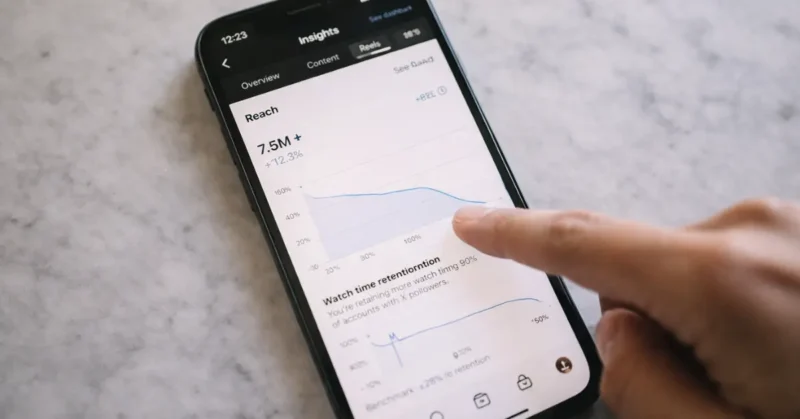
Instagram’s algorithm in 2026 heavily rewards watch time, saves, and shares not just likes. Getting all three requires content that’s genuinely engaging from frame one. The average human scrolls past a Reel in under two seconds if nothing pulls them in.
AI tools now do something that used to take a team of three: they analyze top-performing content in your niche, suggest hooks, auto-cut footage to music beats, generate captions that drive saves, and even predict what time your specific audience is most active. No, this isn’t science fiction these features exist in tools you can start using today, many for free.
According to Instagram’s official Creator Blog, Reels with strong watch time and saves are prioritized in the recommendation feed over posts that only receive likes.
Key shift in 2026: AI isn’t just editing your Reels anymore it’s helping you understand your audience before you hit record. That’s the strategic edge most creators are missing.
Top 6 AI Tools for Instagram Reels — With Insights Most Blogs Miss
1. CapCut (AI Suite) — Editor’s Pick | Freemium
Everyone knows CapCut for transitions. But the feature almost no one uses? Auto-Reframe + AI Script Generator. You paste a blog post or product description, and it generates a Reels script, auto-selects stock clips, and syncs them to trending audio in under 3 minutes. The AI-powered “CapCut Assistant” also gives you hook suggestions based on what’s currently trending in your content niche. I used this to take a 1,200-word article and turn it into five separate Reels drafts in an afternoon.
- Best for: All-in-one video editing and scripting
- Free tier: Generous — watermark is removable
- Hidden gem: AI script-to-video pipeline
- Platform: iOS, Android, Web
2. Opus Clip — AI Tools For Reels
This one is wildly underrated for Reels repurposing. You upload a long YouTube video, podcast episode, or webinar, and Opus Clip uses AI to identify the most viral-worthy moments complete with a “virality score.” But here’s what I didn’t expect: the AI captions are spoken-word accurate and auto-formatted in the punchy style that performs on Reels.

And if you’re also creating on YouTube, the same Opus Clip workflow applies directly — we broke down exactly how in This AI Trick Makes YouTube Shorts Go Viral Overnight, where the same virality-scoring method produced some genuinely surprising results on the YouTube algorithm.
It also suggests where to add text overlays based on silence gaps. For anyone doing educational or talking-head content, this cuts post-production time by 80%.
- Best for: Repurposing long-form content into Reels
- Free tier: 60 minutes of video upload per month
- Hidden gem: Virality scoring per clip
- Platform: Web only
Opus Clip (opus.pro) has become a go-to tool for repurposing long-form video into Reels, with over 1 million creators using its AI-powered clipping engine as of 2025.
Submagic — Best for Viral Captions + Direct Publishing
Submagic creates animated viral-style captions that keep viewers watching even on mute — which matters because half of Instagram videos are now watched without sound. The biggest 2026 upgrade: as of March 2026 you can schedule and publish directly to Instagram, TikTok, YouTube Shorts, and LinkedIn without leaving the app. If your Reels get views but low engagement, better captions alone can fix it.
- Free tier: Trial available
- Paid: From $20/month
- New in 2026: Direct Instagram publishing built in
3. Runway ML (Gen-3) — Paid
For creators who want AI-generated visuals in their Reels not just AI editing Runway’s Gen-3 model is unmatched. You can generate cinematic B-roll clips from a text prompt, remove backgrounds without a green screen, and use motion tracking to add text that sticks to objects in your video.
The “Act One” facial animation tool lets you lip-sync an AI avatar to any script. This is the tool fashion creators and brand accounts are using to produce studio-quality Reels without a camera crew.
- Best for: High-production creators and brands
- Free tier: 125 credits (limited)
- Hidden gem: AI B-roll generation from text prompts
- Platform: Web, iOS
Runway ML (runwayml.com) is trusted by professional filmmakers and Fortune 500 brands — it was used in production for major Hollywood projects, which signals just how seriously the industry takes its AI video capabilities.
4. Predis.ai — Freemium
This is the tool I wish I’d found earlier. Predis.ai does something unique: it analyzes your Instagram account, your competitor accounts, and trending posts in your niche, then generates complete Reels concepts hook, script, visuals, and caption all tailored to your brand voice. It’s less of a video editor and more of a strategic content planner.
The “Competitor Insights” feature alone is worth the free trial. You can literally see what style of Reels is performing for accounts like yours right now.
- Best for: Strategy and content planning
- Free tier: 15 posts per month
- Hidden gem: Competitor Reels analysis
- Platform: Web
Competitor analysis is just one piece of the research puzzle. If you want a full system for never running out of Reels ideas, our guide on AI Tools for Content Ideas & Research covers the complete research-to-content pipeline that top creators are using right now.
NemoVideo — Best for Trend Analysis + Conversational Editing
NemoVideo analyzes what’s working across millions of viral videos and tells you why — then helps you build around those patterns from whatever raw material you have. The editing is conversational: describe what you want changed, the video changes. No timeline scrubbing, no keyframes. Plans start from $4.17/month with 100 free credits to start.
- Free tier: 100 credits
- Paid: From $4.17/month
- Standout: Chat-based editing + built-in viral pattern analysis
5. Descript — Freemium
Descript remains one of the most elegant AI tools for Reels editing especially for talking-head content. Edit video by editing the transcript. Delete an “um” in text, it disappears from your video. But the underused feature: Overdub 3.0. You can now correct misspeaks in your Reels by typing the correction, and your AI voice clone says it. No reshooting. This is massive for educators and coaches who film a lot. It also auto-removes filler words and silences across your entire video in one click.
- Best for: Talking-head, podcast, and educational content
- Free tier: 1 hour of transcription per month
- Hidden gem: Text-based video editing
- Platform: Mac, Windows, Web
6. Fliki AI — Freemium
Fliki is the best free AI tool for Instagram Reels creation if you want to go from idea to finished video without touching a camera. You write a script (or paste a blog post), choose a voice from 1,500+ AI voices in 75 languages, and Fliki auto-picks stock footage and music. The vertical format export is built specifically for Reels. For faceless content creators in niches like finance, wellness, or travel, this is hands-down the fastest zero-cost workflow available.
- Best for: Faceless content and text-to-video creation
- Free tier: 5 minutes of video per month
- Hidden gem: 75-language AI voiceover support
- Platform: Web
Step-by-Step Workflow: Creating Viral Instagram Reels With AI in 2026
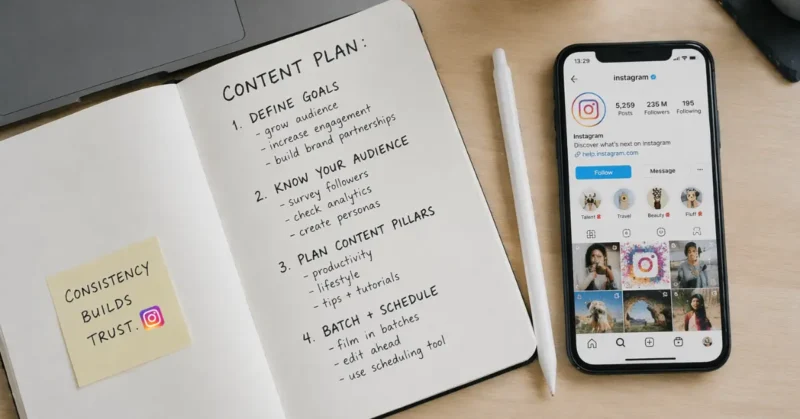
- Find underserved topics, not just trending ones. Use Predis.ai’s competitor analysis to find what’s performing in your niche — then find the gaps. Posting a saturated trending topic gets buried. Finding the adjacent underserved angle gets you recommended.
- Write a 3-part script. Hook → Value → CTA. Keep it under 200 words. Use ChatGPT or CapCut’s script generator with your hook as the prompt.
- Struggling to come up with Reels angles week after week? We covered exactly this problem in Unlock Your Blog’s Potential: The AI Tool That Writes 100 Ideas in an Hour — the same AI ideation method works just as well for generating Reels hooks and concepts in bulk.
- Generate or film your visuals. If you’re on camera, film in one take (Descript will clean it up). For faceless Reels, use Fliki or Runway for AI-generated clips.
- Edit with AI. Drop footage into CapCut or Descript. Let AI auto-cut to beat, add captions, remove silence, and suggest transitions.
- Add captions and overlays. Opus Clip and CapCut both generate auto-captions. Use large, bold text (the “Impact” style still converts best in 2026).
- Use Trial Reels before publishing to your full audience. Instagram’s Trial Reels feature lets you test content with non-followers first. If the trial performs well, push it live. If it underperforms, fix the hook before your existing followers see weak content. This is the most underused feature in Instagram’s creator toolkit.
- Hootsuite’s annual research on best times to post on Instagram is a reliable starting benchmark — but always cross-reference it with your own audience’s activity data inside Instagram Insights.
- Analyze and iterate. After 48 hours, pull your watch time retention graph in Instagram Insights. The drop off point tells you exactly where your next Reel needs to improve.
- Check DM Shares in Insights at 48 hours, not views. Sends is the metric that predicts future algorithmic distribution. A Reel with 2,000 views and 40 DM shares will consistently outperform one with 10,000 views and 5 shares in the next distribution cycle.
Most creators skip Step 7. The watch time retention graph inside Instagram Insights is the most underused analytics feature in all of content marketing. If 60% of viewers drop off at the 4-second mark, your hook isn’t landing not your whole Reel.
Comparison Table: Best AI Tools for Instagram Reels 2026
| Tool | Free Tier | Best For | New in 2026 | Starting Price |
|---|---|---|---|---|
| CapCut | Yes (4K, no watermark) | Free editing + templates | AI avatars, storyboard builder | $8/mo Pro |
| Opus Clip | 60 min/month | Repurposing long content | AI hook customization | $15/mo |
| Submagic | Trial | Viral captions | Direct Instagram publishing | $20/mo |
| Predis.ai | 15 posts/month | Strategy + growth | Keyword caption optimization | $25/mo |
| Magic Hour | Trial | AI video creation | Image-to-video for Reels | Tiered |
| InVideo AI | Limited exports | Faceless content | Sora 2 + VEO 3.1 integration | $20/mo |
| NemoVideo | 100 credits | Trend analysis + editing | Chat-based video editing | $4.17/mo |
Pros and Cons of Using AI Tools for Reels
Pros:
- Cuts production time from hours to minutes
- Removes skill barriers no editing experience needed
- Data-backed hook and script suggestions
- Consistent output with no creative blocks
- Scales faceless content without a team
- Auto-captions boost accessibility and watch time
Cons:
- AI-generated videos can feel sterile or generic
- Over-reliance kills your unique creative voice
- Free tiers are limiting for high-volume creators
- AI stock footage is often recognizable and repetitive
- Auto-captions need manual review for accuracy
- Trend-chasing via AI can make content feel reactive
Best Tool Recommendations by Use Case
- You’re a coach or educator: Start with Descript (edit by transcript) + CapCut (auto-captions and beat sync).
- You’re a faceless niche creator: Fliki for text-to-video creation, Predis.ai for competitor research.
- You’re a brand or agency: Runway ML for high-end visuals + Predis.ai for strategy.
- You repurpose podcasts or YouTube: Opus Clip is non-negotiable — nothing else comes close for this workflow.
- You’re a beginner with zero budget: CapCut’s free tier handles 80% of what you need. Start there.
Common Mistakes to Avoid
Using AI captions without reviewing them. AI misses context constantly. A single wrong word can change the entire tone of your Reel.
Letting AI pick your music. The algorithm rewards Reels that use trending audio. Check the Reels audio tab on Instagram and manually add it don’t trust AI to know what’s trending today.
Forgetting the first frame. Even if AI edits your video perfectly, if your thumbnail frame isn’t compelling, people won’t tap. Set it manually.
Over-automating posting. Scheduling tools are great, but responding to comments in the first hour is still the biggest organic reach multiplier. AI can’t do that for you.
Copying AI-suggested hooks word-for-word. These hooks are trained on what worked before. Add your voice or they’ll sound generic to seasoned scrollers.
Marketing expert Neil Patel notes that one of the biggest mistakes creators make is optimizing for views alone saves and shares carry significantly more algorithmic weight for long-term account growth.
Pro Tips – AI Tools For Reels

Tip 1: Use CapCut’s “Smart Highlight” feature to identify the most energetic moments in your raw footage before you edit. It saves you from re-watching everything.
Tip 2: In Predis.ai, analyze 3–5 competitor accounts monthly, not just one. Patterns across multiple accounts reveal what the algorithm is actually rewarding right now.
Tip 3: Opus Clip’s virality score above 8 out of 10 is a strong signal. If your clip consistently scores below 6, it’s your source content that needs to improve — not the AI clip selection.
Tip 4: For Runway-generated B-roll, always describe lighting and camera movement in your prompt. “Soft morning light, slow push-in shot” produces dramatically better results than just describing the subject.
Tip 5: Stack Descript (edit) → CapCut (style + captions) → Predis.ai (schedule + analyze). This three-tool workflow costs under $30/month combined and replaces a $5K/month editing team for most solo creators.
Future Trends in AI Tools for Instagram Reels
By late 2026, expect AI tools to move from reactive (editing what you made) to predictive (telling you what to make before you film). Platforms like Instagram itself are testing AI content advisors that plug directly into the Creator Studio. We’re also seeing the early rise of real-time AI co-directors tools that analyze your live recording and suggest adjustments mid-shoot via earpiece or screen prompt.
Personalized AI avatars are becoming viable for Reels, not just YouTube. Heygen and D-ID have both improved lip-sync accuracy enough that avatar-based short-form content now passes a casual scroll without obvious tells.
The creator economy split that’s coming: those using AI tools strategically to amplify human creativity, versus those using AI as a replacement for it. The first group will dominate. The second group will produce content that blends into the noise. The difference is whether you’re using these tools to make your ideas better — or to avoid having ideas at all.
Forbes projects the creator economy will surpass $480 billion by 2027, making tools that reduce production cost while increasing content quality not just useful — but essential for any creator treating their channel as a business.
FAQs – AI tools for Instagram Reels
What are the best free AI tools for Instagram Reels in 2026?
The best free AI tools for Instagram Reels creation in 2026 are CapCut (editing + scripts), Fliki (text-to-video for faceless content), and Predis.ai (strategy + caption generation). All three offer generous free tiers that cover most solo creator needs without requiring a credit card to start.
Can AI tools really help Instagram Reels go viral?
Yes — but not by magic. AI tools improve your odds by helping you craft stronger hooks, auto-sync footage to trending audio, generate data-backed scripts, and identify the best moments in your content. Going viral still requires posting consistently and understanding your specific audience, but AI significantly compresses the time it takes to produce high-quality Reels.
Which AI tool is best for Instagram Reels editing in 2026?
For pure editing, CapCut leads for most creators — it’s fast, has strong AI features, and the free tier is genuinely useful. For talking-head content specifically, Descript is superior because it lets you edit video by editing the transcript. For brand-level production quality, Runway ML is unmatched.
How do I use AI tools to automate Instagram Reels content creation?
The most effective automation workflow is: use Predis.ai for content planning and scheduling, CapCut or Descript for editing, and Opus Clip for converting long-form content into Reels. This stack handles scripting, editing, and posting automation without losing content quality. Full automation of engagement (comments, DMs) is not recommended — it violates Instagram’s terms of service.
Is there a free AI tool to create Instagram Reels from a blog post or script?
Yes. Fliki and CapCut’s AI Script-to-Video feature both do this for free. You paste your blog post or script, and the tool generates a vertical video with stock footage, AI voiceover, and auto-captions. Fliki is better for faceless content. CapCut is better when you want more manual control over the final look.
Conclusion – AI Tools For Reels
If you came here looking for a list of tools to paste into a workflow you’ll try once and abandon, this isn’t it. The creators who are consistently winning on Reels in 2026 are treating AI as a creative partner with a specific role not a content factory. Use CapCut for editing speed, Predis.ai for strategic insight, Opus Clip for repurposing, and Runway for visual differentiation. Layer them based on your niche and budget.
The most important thing: don’t wait until everything is perfect. Start with one AI tool for Instagram Reels this week CapCut if you’re on a budget, Predis.ai if you want strategy. Publish something. Look at the retention graph 48 hours later. Adjust. Repeat. That cycle, done consistently with AI support, is what going viral actually looks like.
2 thoughts on “AI Tools for Instagram Reels That Actually Go Viral (Step-by-Step)”