
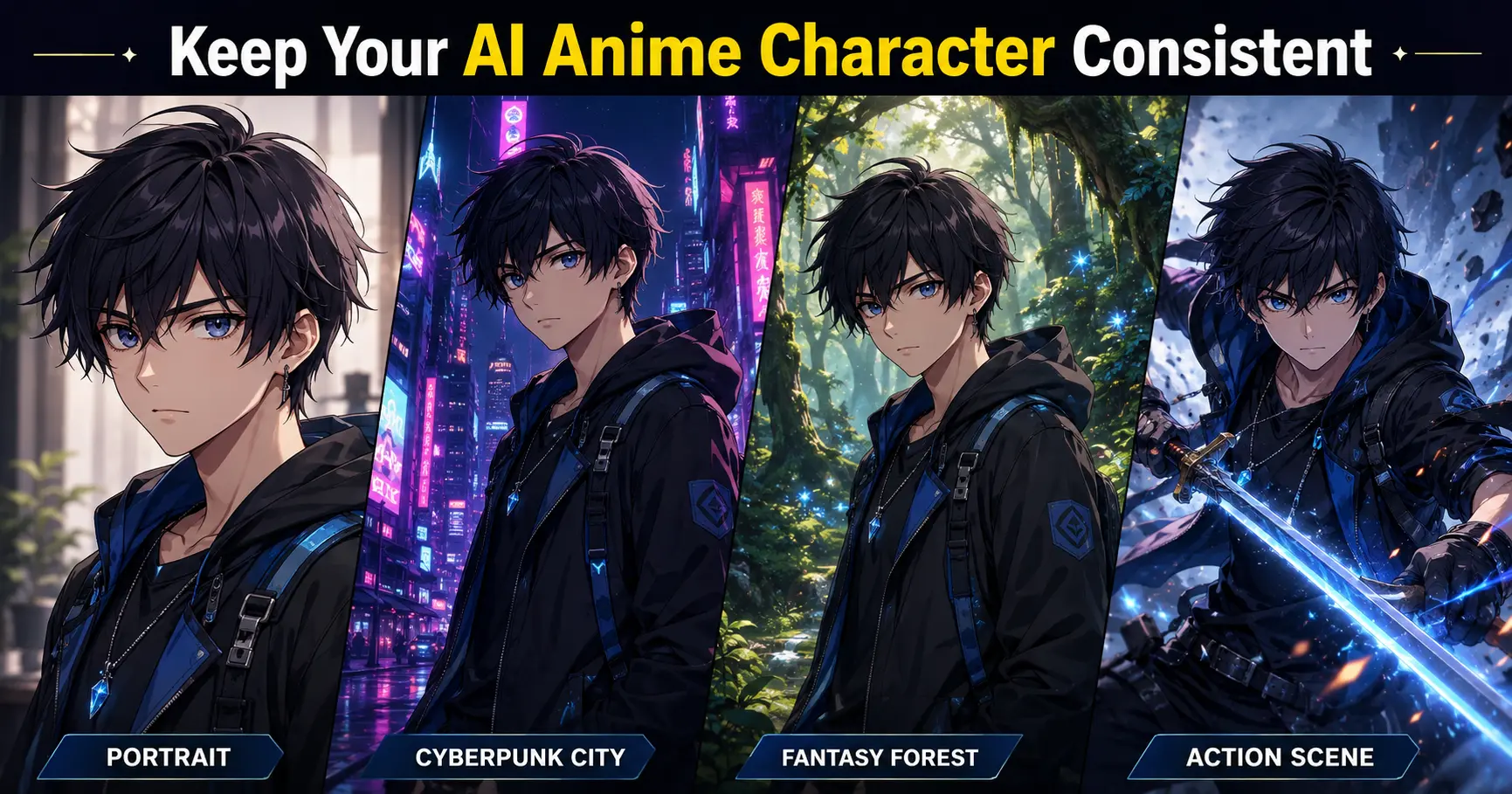
If you’ve ever spent 15 minutes creating the perfect anime character only to watch them transform into a completely different person in the next image, you’re not doing anything wrong.
I’ve been there.
The hairstyle changes.
The face becomes wider.
The eyes suddenly look different.
Even the clothes change when you never mentioned them in the prompt.
This problem is one of the biggest reasons creators struggle with AI-generated anime art. Whether you’re making a manga, a visual novel, YouTube thumbnails, a VTuber avatar, or an original webcomic, random character changes can quickly ruin your workflow.
Character consistency is one of the most important factors when choosing an anime image generator. For a broader comparison of tools, pricing, image quality, and commercial use, read my guide to Best AI Anime Art Generators (2026) Features, Pricing, Character Consistency & Commercial Use Compared.
The good news is that AI image generation has improved dramatically over the last year. Tools like Midjourney, Stable Diffusion, and several newer AI platforms now include features specifically designed to reduce character drift and improve consistency.
The trick isn’t writing longer prompts. It’s building a repeatable workflow.
In this guide, I’ll show you how to keep AI anime characters consistent using practical techniques that actually work in 2026. I’ll also explain why your AI characters keep changing, how to lock important visual traits, and which tools are best for maintaining the same character across multiple scenes.
Quick Answer – how to keep AI anime characters consistent
The best way to keep AI anime characters consistent is to combine a detailed character description with reference images, consistent prompts, and model-specific features such as Midjourney Character Reference (
--cref) or Stable Diffusion ControlNet and LoRA. Changing only the scene—not the character—produces much more reliable results.
Table of Contents
Why Do AI Anime Characters Keep Changing?
One misconception I see all the time is that AI remembers the last image it created.
It doesn’t.
Every new generation starts as a fresh interpretation unless you give the model information that connects it to previous images.
Think of it like hiring a different illustrator for every drawing.
If you simply say:
Anime girl with blue eyes
every artist will imagine someone different.
AI behaves in exactly the same way.
Without a reference image or a structured prompt, the model fills in the missing details on its own.
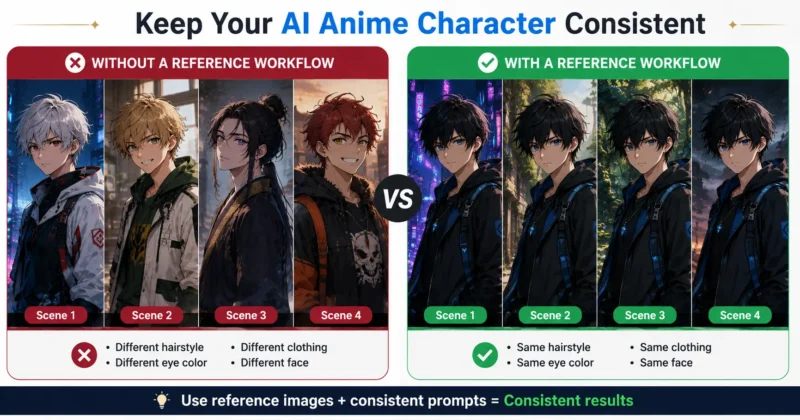
That’s why creators often search for questions like:
- Why do my AI characters keep changing?
- How do I generate the same character in AI art?
- How do I stop AI character face drift?
- Can AI keep characters consistent?
The answer is yes but only when you stop treating every image as a brand-new project.
Consistency comes from controlling the variables instead of changing everything with every prompt.
Start With a Character Bible, Not a Prompt
One habit separates experienced AI artists from beginners.
Professionals rarely start with prompts.
They start with a character bible.
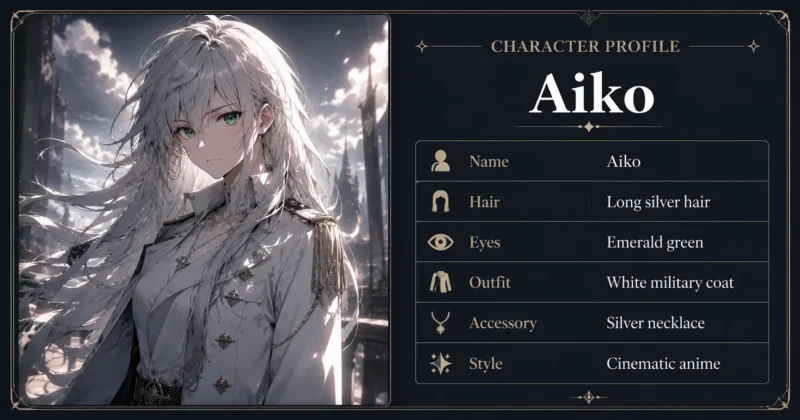
Instead of writing a completely different description every time, create one master profile that never changes.
Mine usually includes:
| Character Trait | Example |
|---|---|
| Name | Aiko |
| Age | 22 |
| Hair | Long silver hair with braided bangs |
| Eyes | Emerald green |
| Height | 168 cm |
| Clothing | White military coat with gold trim |
| Accessories | Black gloves, silver necklace |
| Personality | Calm, determined |
| Art Style | Cinematic anime illustration |
Whenever I generate a new image, this information stays exactly the same.
The only things I change are:
- Camera angle
- Pose
- Expression
- Environment
- Weather
- Time of day
That simple habit dramatically improves consistency before you even start using advanced AI features.
Use Midjourney Character Reference (--cref)
If you’re using Midjourney, the Midjourney character reference tool is probably the biggest improvement for creators who need recurring characters.
If you’re also deciding whether Midjourney or PixAI is better for professional anime artwork, see my detailed Midjourney Niji 7 vs PixAI comparison, where I compare image quality, character consistency, workflow, pricing, and real creator use cases.
Because Midjourney features and supported parameters can change, check the official Midjourney documentation before using the workflow in a production project.
Instead of relying only on text, Midjourney lets you provide a reference image that helps preserve the character’s identity.
A simple workflow looks like this:
- Generate your best version of the character.
- Upscale the image.
- Copy its image URL.
- Add the URL using the
--crefparameter. - Change only the background, action, or camera angle.
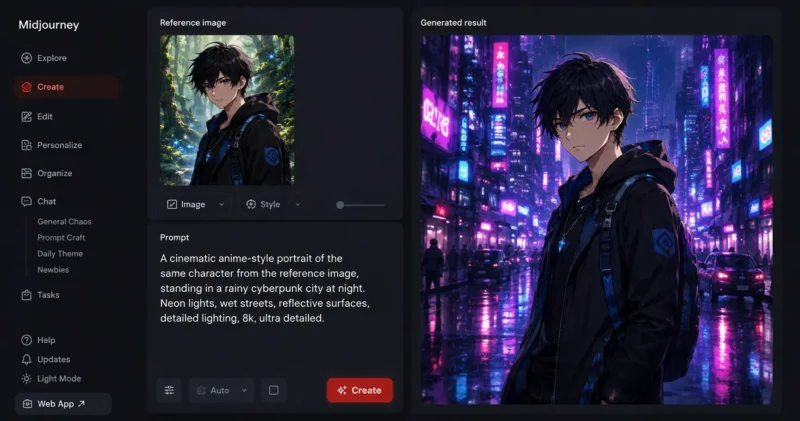
For example:
Image 1
Anime girl standing in Kyoto during spring.
Image 2
Same character exploring a futuristic cyberpunk city.
Image 3
Same character riding a dragon above snowy mountains.
Because every image references the same original character, facial structure, hairstyle, and overall identity remain much more stable.
If you’re learning how to use --cref in Midjourney, think of it as giving the AI a visual memory instead of asking it to imagine the character again from scratch.
Understanding Midjourney Character Weight (--cw)
Many creators use --cref but ignore another powerful setting: Midjourney consistent character weight (--cw).
This value controls how closely Midjourney follows the reference image.
A common question is:
Midjourney --cw 0 vs --cw 100`—which is better?
The answer depends on your goal.
| Character Weight | Best Use |
|---|---|
--cw 0 | Maximum creativity and new variations |
--cw 25–50 | Balance between consistency and flexibility |
--cw 75–100 | Strong facial and clothing consistency |
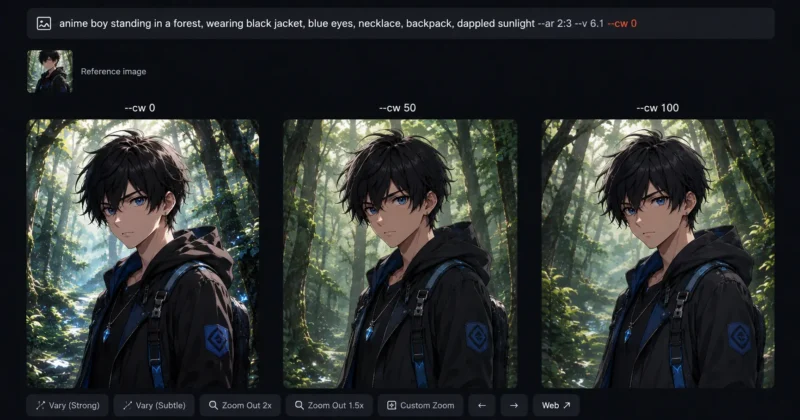
You can test the latest character-reference options directly through the official Midjourney website.
If you’re creating a manga protagonist or a recurring YouTube mascot, a higher character weight usually produces more dependable results.
If you’re experimenting with different outfits or artistic interpretations, lowering the weight allows the AI to be more creative while still keeping the character recognizable.
Lock the Face Before Changing Anything Else
One mistake I made early on was changing too many things at once.
I’d rewrite the hairstyle.
Change the clothing.
Add new accessories.
Switch the art style.
Then I’d wonder why the character looked completely different.
Now I follow one simple rule:
Lock the face first.
Before experimenting with dramatic scenes or action poses, make sure these traits stay identical:
- Face shape
- Eye color
- Hair color
- Hairstyle
- Age
- Skin tone
- Signature accessories
Once those features remain stable, you can safely change the environment, camera angle, lighting, and pose without losing the character’s identity.
This single workflow reduced inconsistent generations more than any prompt trick I tested.
Create an AI Anime Character Reference Sheet
One technique that deserves far more attention is building an AI anime character reference sheet.
Instead of generating random scenes immediately, spend a little time creating one visual reference document for your character.
Include:
- Front view
- Side profile
- Three-quarter angle
- Full-body pose
- Neutral expression
- Happy expression
- Angry expression
- Sitting pose
- Action pose
- Different lighting conditions
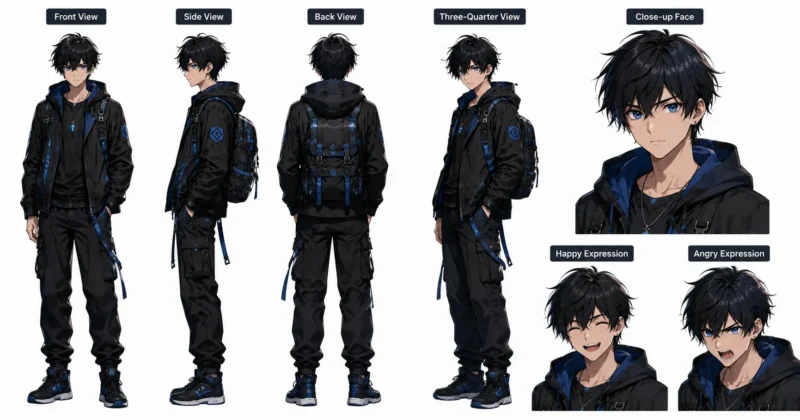
Think of it as your character’s official design sheet.
Whether you later use Midjourney, Stable Diffusion, OpenArt, or another AI image generator, you’ll always have a consistent visual foundation to work from.
Most artists already do this before starting a comic or animation project. AI creators benefit from exactly the same approach.
Use Stable Diffusion for Maximum Character Consistency
If Midjourney gives you beautiful artwork, Stable Diffusion gives you control.
If you’re comparing these platforms beyond character consistency, my Midjourney vs. DALL·E 3 vs. Stable Diffusion: Which Is Best for Creators? guide explains their differences in image quality, creative control, workflow, and practical use cases.
That’s why many manga artists, indie game developers, and visual novel creators still prefer it for long-term projects. The learning curve is steeper, but once your workflow is set up, it’s hard to beat.
One of the biggest advantages is the ability to combine Stable Diffusion ControlNet Reference Only, consistent anime character LoRAs, and DreamBooth multi-token LoRA. Together, they help the model preserve facial structure, hairstyles, clothing, and even small details like scars or accessories.
For a technical explanation of how reference-based control works, the ControlNet Reference-Only documentation explains how a source image can guide a new generation without requiring a separate control model.
Here’s the workflow I use:
- Create one high-quality “master” character image.
- Train or select a character LoRA that matches your design.
- Use ControlNet Reference Only to keep facial proportions and pose consistent.
- Save your prompt template and avoid changing core character details.
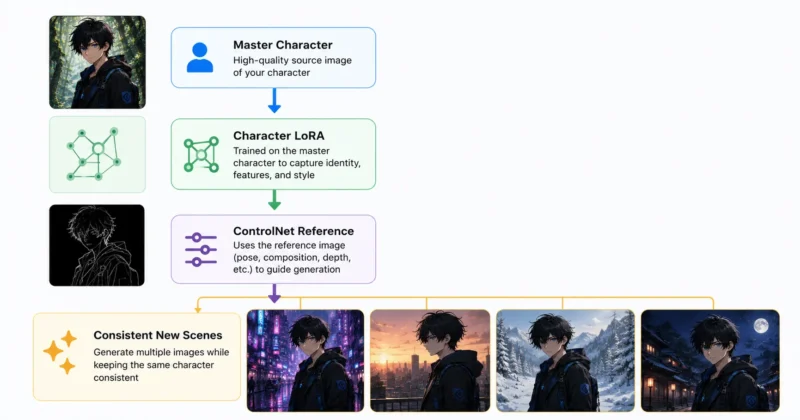
If you use AUTOMATIC1111 locally, you can review installation details and supported features in the official ControlNet WebUI repository.
This approach works especially well for comics, storyboards, and AI story animation projects where the same character appears dozens of times.
Keep Clothing Consistent Without Rewriting Everything
Changing outfits is one of the fastest ways to confuse an AI model.
Instead of describing clothing differently in every prompt, create a fixed clothing prompt that never changes.
For example:
Fixed Character Traits
- White military jacket with gold trim
- Black gloves
- Brown leather belt
- Knee-high black boots
- Silver pendant
Then only change the scene:
- Walking through Tokyo at night
- Standing in a bamboo forest
- Flying above futuristic skyscrapers
This simple method answers one of the most common questions creators ask:
How to keep same clothing in AI art?
The answer isn’t a secret prompt—it’s consistency. The fewer visual traits you change, the more consistent your results become.
Use Character Turnaround Prompts
Professional character designers almost never rely on a single portrait.
Before creating action scenes, they build a complete turnaround sheet showing the character from multiple angles.
A useful AI character turnaround prompt looks like this:
Anime character turnaround sheet, front view, side profile, back view, three-quarter view, neutral pose, white background, consistent facial features, same clothing, clean concept art, anime style.
Once you have this reference sheet, future generations become much easier because the AI has multiple views of the same character to learn from.
Lock Your Character Description
One mistake I see constantly is changing the wording of the prompt every time.
Instead, create a permanent “character lock” section and copy it into every prompt.
For example:
Character Lock
- Female
- 22 years old
- Long silver hair
- Emerald green eyes
- Small scar below left eye
- White military jacket
- Black gloves
- Calm personality
Everything below this section can change:
- Pose
- Background
- Weather
- Camera angle
- Lighting
- Expression
This technique, sometimes called character description lock AI, reduces face drift much more effectively than adding random descriptive words.
Other AI Tools Worth Trying
Although Midjourney and Stable Diffusion are the most popular options, several newer tools have introduced useful consistency features.
- OpenArt makes it easy to build reusable character projects and maintain a consistent visual style.
- Ideogram continues improving character generation while producing readable text, making it useful for posters, comics, and marketing graphics.
- Kling AI is becoming popular for turning consistent character images into animated scenes.
- Google Labs ImageFX is improving prompt understanding and image quality, making it an interesting option to watch as its features evolve.
None of these tools is perfect, but they’re worth testing if your workflow extends beyond still images.
Common Mistakes That Cause Character Drift
After hundreds of test generations, I noticed the same mistakes over and over again.
Avoid these if you want better consistency:
- Changing hairstyle and clothing in the same prompt
- Mixing multiple anime styles
- Rewriting your character description every generation
- Ignoring reference images
- Using low-quality reference images
- Switching checkpoints or LoRAs halfway through a project
- Changing the art style from cinematic to chibi without expecting differences
- Editing too many visual traits at once
Whenever something goes wrong, change one variable at a time. That makes it much easier to understand what caused the inconsistency.
Character Consistency Checklist
Before generating a new image, I quickly review this checklist:
| Checklist Item | Status |
|---|---|
| Same reference image | ✓ |
| Same hairstyle | ✓ |
| Same eye color | ✓ |
| Same clothing | ✓ |
| Same accessories | ✓ |
| Same art style | ✓ |
| Same LoRA or reference | ✓ |
| Same core prompt | ✓ |
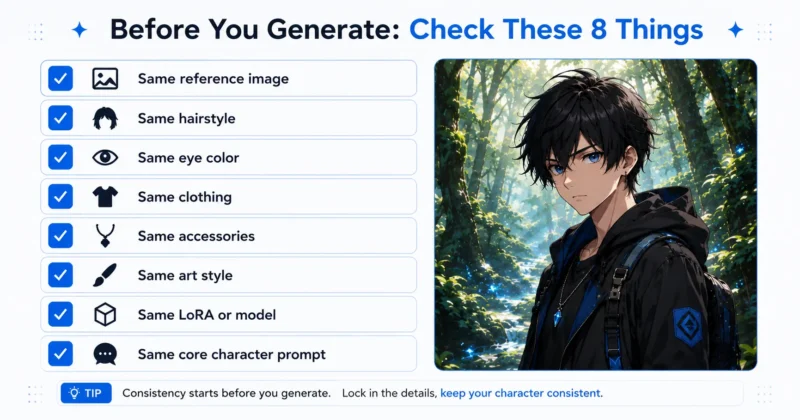
If most of these remain unchanged, the AI is much more likely to produce a recognizable version of the same character.
FAQs – How to keep AI Anime Characters consistent
How to keep AI anime characters consistent?
Use a master character description, reference images, and consistency features like Midjourney --cref or Stable Diffusion ControlNet. Keep visual traits identical while changing only the scene or pose.
Can Midjourney generate the same anime character every time?
It can get very close when you use Character Reference (--cref), appropriate character weight (--cw), and consistent prompts. Small variations may still occur, especially with complex poses.
What is the best AI tool for consistent anime characters?
For ease of use, Midjourney is excellent. For maximum control over long-term projects, Stable Diffusion with ControlNet and LoRA remains one of the strongest choices.
Why do my AI characters keep changing?
Every generation is treated as a new request unless you provide reference images or maintain a consistent prompt structure. Changing multiple visual traits at once also increases character drift.
How can I keep the same face and clothing in AI art?
Create one fixed character description, reuse the same reference image, and avoid changing hairstyle, facial features, or clothing between prompts. Only adjust the background, camera angle, lighting, or expression.
Final Thoughts
Keeping AI anime characters consistent isn’t about finding one perfect prompt. It’s about building a workflow that removes unnecessary variation.
Start with a strong character reference sheet. Keep your visual traits locked. Use reference tools instead of rewriting descriptions. Test one change at a time, and save the prompts that work.
Once you follow this process, you’ll spend less time fixing inconsistent generations and more time creating comics, animations, YouTube content, games, or illustrations with characters that actually look like the same person from one image to the next.
Whether you’re using Midjourney, Stable Diffusion, or another AI generator, consistency comes from discipline—not luck. And once you develop that habit, you’ll notice a huge improvement in every project you create.