
Typing speed is one of those skills we often ignore—until slow typing starts wasting hours of our day.
While searching for a reliable typing practice app, I recently discovered a powerful typing tutor app for windows 2026 available on the Microsoft Store, and honestly, it surprised me more than I expected.
This typing tutor app for Windows is a great example of how modern productivity tools can genuinely improve daily work.
In a space filled with basic and repetitive typing tools, this app felt different from the first session. It’s clean, distraction-free, and designed for real improvement, not just random practice.
After using it consistently, I noticed clear improvements in both typing speed and accuracy—something that usually takes weeks with ordinary tools.
Table of Contents
Why This Typing Tutor App Feels Different
This is not just another free typing website.
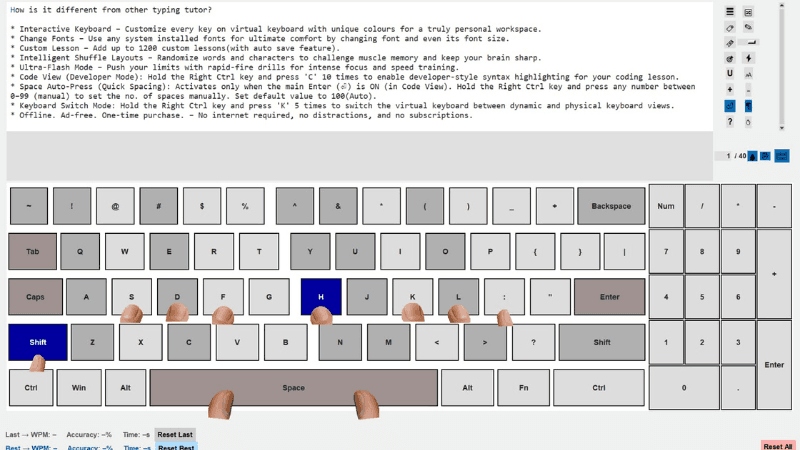
What makes this typing tutor stand out is its focus on serious users and long-term productivity:
- ✅ One-time purchase (no subscriptions)
- ✅ Completely offline
- ✅ No ads, no tracking, no distractions
- ✅ Built for speed, accuracy, and mastery
For anyone searching for a typing speed improvement app for Windows 2026, this checks almost every box.
Exclusive Discount for Readers 🎉
After trying the app, I personally reached out to the developer to see if a special offer was possible for our readers.
Good news 👇
- 🎁 20% OFF Discount
- 📅 Starts: 17 January 2026
- 📅 Ends: 31 January 2026
That’s plenty of time to grab this professional typing tutor app at a reduced price.
App Details
App Name: THE ULTIMATE (Typing Tutor)
Platform: Microsoft Store (Windows)
Purchase Type: One-time payment
Internet Required: No
This is a lifetime-access typing practice tool, not a subscription trap.
Download the typing tutor app for Windows from the Microsoft Store
Who Should Use This Typing Tutor?
This app is ideal for anyone who spends time on a keyboard and wants to work faster with less effort.
Perfect for:
- Students preparing for exams, assignments, and competitive tests
- Office professionals who want to finish work in half the time
- Programmers & developers practicing code typing
- Writers & content creators who type daily
- Anyone looking for a serious typing practice app for Windows
With good typing speed, tasks that normally take 6–7 hours can often be completed in under 3.
Key Features That Make This a Powerful Typing Practice Tool
Fully Customizable Virtual Keyboard
- Assign custom colors to each key
- Improve finger memory visually
Advanced Font Control
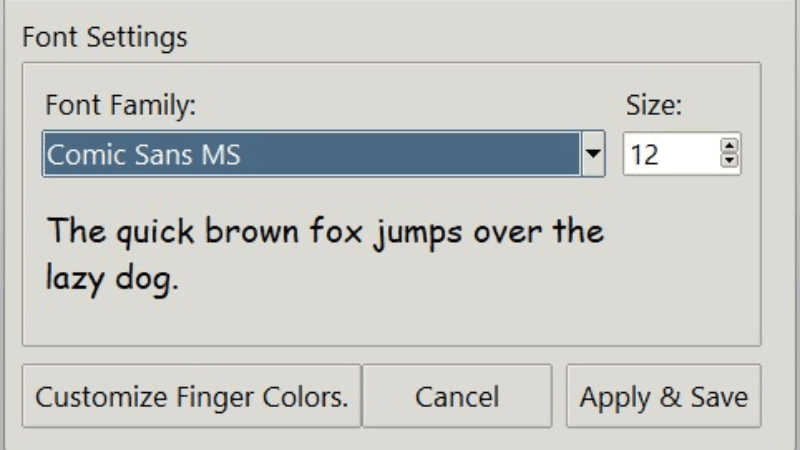
- Use any system font
- Adjust font size for eye comfort
Custom Lesson Creation
- Create and auto-save up to 1200 lessons
- Practice text, lyrics, or even code
Intelligent Shuffle Practice
- Randomized layouts prevent memorization
- Improves real-world typing speed
Flash Mode & Ultra-Flash Mode
- High-speed drills for advanced users
- Ideal for breaking speed plateaus
Developer Mode for Programmers
This typing tutor also supports coding practice, which is rare.
Code View (Developer Mode)
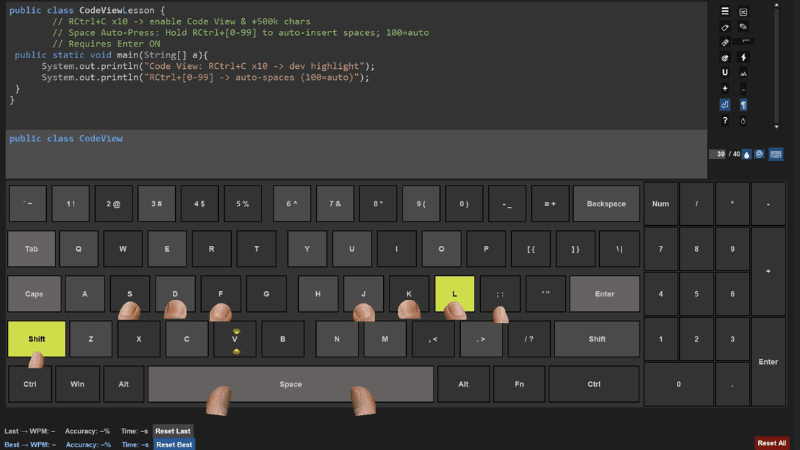
- Enable by holding Right Ctrl + pressing ‘C’ 10 times
- Syntax-highlighted coding lessons
Smart Space Auto-Press
- Manual (0–99) or Auto (100)
- Works intelligently in code typing mode
Keyboard Layout Switching
- Hold Right Ctrl + ‘K’ 5 times
- Switch between keyboard layouts instantly
For developers who spend long hours coding, improving typing efficiency is as important as using the right development tools.
Productivity & Accessibility Features
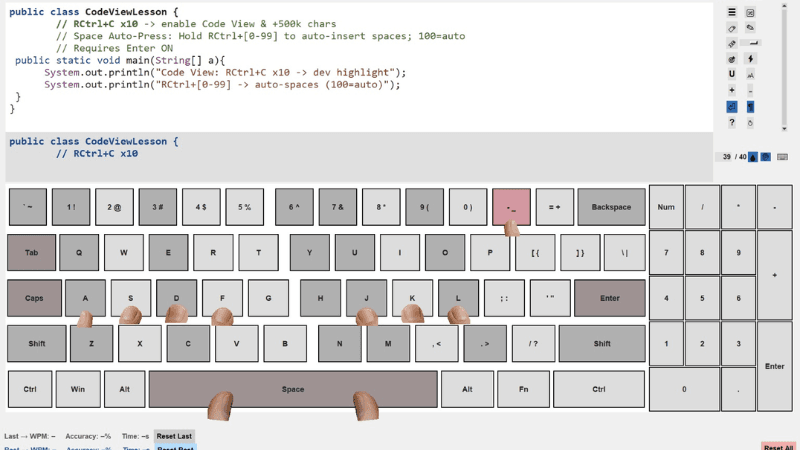
- 🌙 Dark Mode & Light Mode
- 🖐 Finger placement overlay
- 📊 Real-time WPM & accuracy stats
- 🔖 Bookmark difficult lessons
- 🧠 Smart hint hiding (Edit Mode)
- 📈 Detailed performance history
Privacy-First Typing Tutor
This app is built with privacy by design:
- No telemetry
- No analytics
- No cloud sync
- No access to files, location, mic, or camera
All data stays locally on your Windows device.
Future Updates (Confirmed by Developer)
Upcoming improvements include:
- Password protection
- Backup & restore functionality
This shows active development and long-term support, which adds strong credibility.
We regularly track updates and improvements in software tools as part of our ongoing tech coverage.
Download the Typing Tutor App for Windows
You can download THE ULTIMATE (Typing Tutor) directly from the Microsoft Store:
👉 https://apps.microsoft.com/detail/9nbcnsfx2zvd
- One-time purchase
- Lifetime access
- Offline typing practice
FAQs – Typing Tutor App for Windows 2026
Is this typing tutor app for Windows free?
This is not a free typing tutor app, but it offers a one-time purchase with lifetime access. There are no subscriptions or hidden charges.
Does this typing tutor app work offline?
Yes, it is a fully offline typing tutor for Windows. Once installed, no internet connection is required.
Is this typing tutor suitable for beginners?
Yes, it is one of the best typing tutors for beginners, with customizable lessons and gradual difficulty levels.
Can students use this typing practice app for exams?
Absolutely. It is a powerful typing practice tool for students preparing for exams, assignments, and competitive tests.
Is this typing tutor useful for programmers?
Yes, it includes a coding typing practice app feature with syntax highlighting, making it ideal as a typing tutor for programmers.
Does this typing tutor show ads or track users?
No. This is an ad-free typing tutor software with a strong privacy-first design. No tracking, analytics, or data collection.
Final Verdict: Is It Worth It?
If you are serious about:
- improving typing speed
- increasing productivity
- typing comfortably for long hours
This is one of the best typing tutor apps for Windows users available today.
Try it once—and you’ll feel the difference.