
Artificial Intelligence has become part of our everyday digital life. From AI chat assistants and smart browsers to autofill tools and cloud-based AI extensions, we rely on AI more than ever. But here’s the uncomfortable truth most users ignore: AI security risks are growing faster than user awareness.
We are now seeing real cases where AI tools accidentally expose passwords, login details, and sensitive account data—not through hacking, but through poor settings, excessive permissions, and cloud memory storage. This guide explains three critical AI security settings you must change immediately to protect your passwords before it’s too late.
This article is written with real-world experience, security best practices, and expert-backed insights, making it reliable, practical, and easy to understand for everyday users.
Table of Contents
Why AI Security Risks Are Rising in 2026
AI systems are designed to learn, remember, and optimize user behavior. While this improves productivity, it also introduces serious risks when sensitive data is involved.
Key reasons AI security risks are increasing:
- AI tools store conversations and user context
- Cloud syncing shares data across devices
- AI browser extensions request broad permissions
- Autofill and clipboard access expose passwords
Unlike traditional cyber threats, AI-related data leaks often happen silently, making them harder to detect and prevent.
As advanced AI agents like Manus AI continue to evolve and outperform traditional AI tools, understanding their security implications becomes more important than ever.”
Setting 1: Turn Off AI Memory and Chat History Storage
Many AI assistants and AI-powered browsers store conversation history to improve responses. Unfortunately, users often share sensitive details without realizing they are being saved.

Why AI Memory Is a Hidden Security Threat
- Login-related conversations may be stored
- Cloud-based AI memory can sync across devices
- Stored prompts may be used for training models
- Data breaches can expose saved interactions
Even if you never directly type a password, contextual clues can reveal account access details.
What You Should Do Now
- Disable AI conversation history
- Turn off AI memory or learning features
- Opt out of data usage for model improvement
- Manually delete past AI chats regularly
This step alone significantly reduces the risk of AI password leaks and data exposure.
Setting 2: Restrict AI Autofill and Clipboard Access
AI-powered autofill and smart keyboards are convenient, but they are also one of the most common causes of password leaks.

Why Autofill and Clipboard Access Is Dangerous
- Copied passwords stay in clipboard history
- AI tools may analyze input patterns
- Autofill databases are prime attack targets
- Browser extensions can read form data
If an AI tool has access to your clipboard or keyboard inputs, your passwords are only one mistake away from exposure.
Google also recommends reviewing autofill and clipboard permissions regularly to prevent unauthorized access.
Best Security Practices
- Disable AI autofill for passwords
- Block clipboard access for AI tools
- Use a trusted password manager only
- Avoid typing credentials while AI tools are active
This simple change protects your credentials from unintentional AI-based data capture.
Even productivity apps like typing tutor tools should be used without unnecessary system permissions, especially when AI features are involved.
Setting 3: Review Third-Party AI Extensions and Integrations
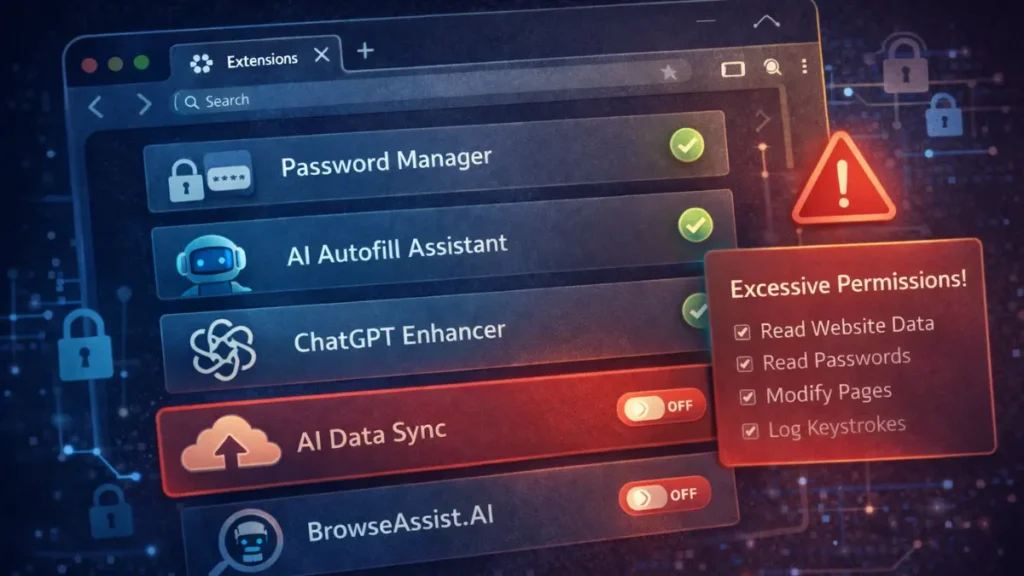
Many users install AI tools without reviewing permissions. Over time, browsers become overloaded with AI extensions that have access to websites, cookies, and session data.
Why Third-Party AI Tools Increase Risk
- Extensions may read all site data
- AI plugins can access login sessions
- Updates may silently expand permissions
- Weak privacy policies expose user data
Each unnecessary AI integration increases your attack surface.
Many popular AI tools used for daily office automation come with browser extensions and plugins that require careful permission review.
What We Recommend
- Remove unused AI extensions
- Allow only minimum required permissions
- Avoid AI tools with unclear data policies
- Regularly audit browser and app permissions
Fewer AI tools mean stronger password security.
How AI Password Leaks Actually Happen
Most AI-related security breaches don’t involve hackers directly. They happen because:
- Users share sensitive context in AI chats
- AI stores and syncs data in the cloud
- Extensions access login pages
- Data is exposed during breaches or misuse
Once leaked, passwords are often used for credential stuffing attacks, leading to multiple account compromises.
You can also check whether your credentials were exposed in previous breaches using trusted databases like Have I Been Pwned.
Expert-Backed AI Security Best Practices
Based on cybersecurity standards and real-world experience, we strongly recommend:
- Enable multi-factor authentication (MFA)
- Use hardware security keys for critical accounts
- Separate AI usage from banking and admin accounts
- Rotate passwords every 90 days
- Monitor account login alerts
These steps align with industry-recommended security frameworks and significantly reduce risk.

According to NIST cybersecurity guidelines, limiting unnecessary system access is one of the most effective ways to reduce data exposure risks.
Why Ignoring AI Security Settings Is Risky
Failure to secure AI tools can lead to:
- Identity theft
- Financial loss
- Social media account hijacking
- Corporate data breaches
- Long-term digital reputation damage
AI adoption is accelerating, and attackers are now targeting AI ecosystems instead of individuals.
FAQs
What is the biggest AI security risk today?
The biggest AI security risk is stored memory, autofill access, and excessive permissions that can expose passwords and sensitive data.
Can AI really leak passwords?
Yes. AI tools can unintentionally expose passwords through stored conversations, clipboard access, and browser extensions.
Should I stop using AI tools completely?
No. You should use AI responsibly by adjusting security settings and limiting permissions.
Is disabling AI memory safe?
Yes. Disabling AI memory improves privacy without affecting basic functionality.
Are AI browser extensions safe?
Only if they come from trusted developers and use minimal permissions. Regular audits are essential.
Final Thoughts: Use AI Smartly, Not Blindly
AI is powerful, but security should always come first. By changing these three settings—AI memory, autofill access, and third-party integrations—you can safely enjoy AI without risking your passwords.
Smart AI usage isn’t about fear—it’s about control.