
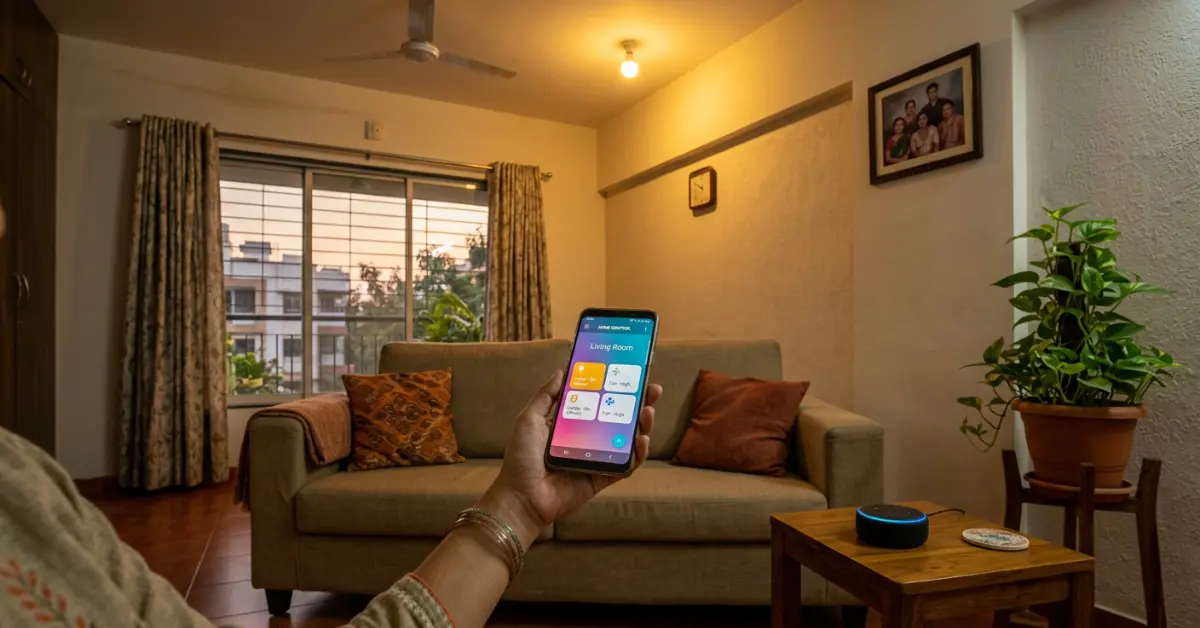
Your electricity bill doesn’t have to keep climbing every summer — smart home IoT 2026 is genuinely affordable now. But here’s the problem: the internet is full of guides written for people in the US or UK, recommending products you can’t find on Amazon India, priced in dollars, for homes nothing like yours. You end up more confused than when you started.
You want simple answers — what to buy, what to skip, how to set it up, and whether it’ll actually save you money. That’s exactly what this guide delivers. You’ll get real device names, real Indian prices, and a setup process that works even if your Wi-Fi router is three years old. Scroll through — your first smart home device is closer than you think.
If you already know you want a shopping list with real Indian prices and honest reviews — the 10 best smart home devices for beginners under ₹5000 in India covers every essential category with specific product picks you can order today.
Disclosure: This post contains affiliate links. If you click a link and buy something, I may earn a small commission — at zero extra cost to you.
Follow us for the latest AI tools, tech gadgets, DevOps, IoT and buying guides to stay ahead in technology.
Table of Contents
Once you’ve got the basics running, you’ll want to understand how AI and IoT are working together in smart homes in 2026 — that’s where automation stops being scheduled and starts being genuinely intelligent.
What Is Smart Home IoT 2026 and Why Does It Actually Matter in 2026?
Smart home IoT 2026 connects everyday devices — lights, fans, locks, cameras — to the internet so you can control them with your phone or voice. In 2026, entry-level devices start at under ₹500 in India, setup takes minutes, and the ecosystem is more stable and compatible than ever, thanks to the new Matter protocol uniting brands.
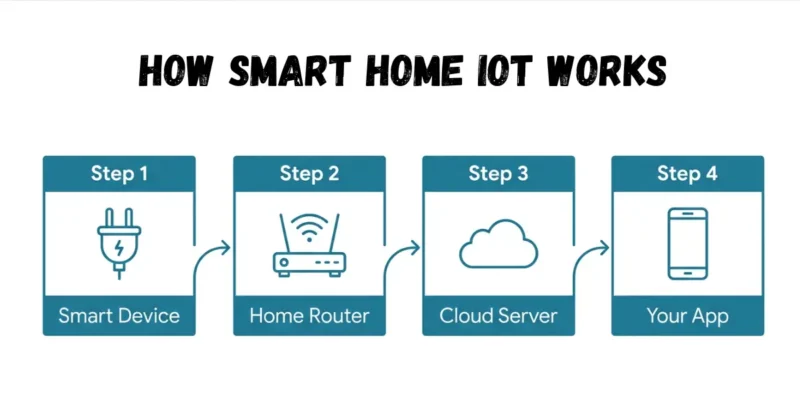
How Smart Home IoT 2026 Actually Works at Home
Your smart plug, smart bulb, or smart lock connects to your home Wi-Fi. From there, it talks to a cloud server — or locally to a hub — and you control it through an app or voice assistant.
Most devices today use 2.4GHz Wi-Fi, which is why your home router is the single most important piece of your smart home setup. Without a stable 2.4GHz signal in every room, devices will drop off constantly.
What actually works is starting with a single device, getting comfortable with the app, then adding more. Trying to automate your entire home in one weekend almost always ends in frustration.
Smart home IoT 2026 devices are just one application of IoT — if you want to understand how the underlying sensor technology actually works, real-world IoT sensor projects like sleep detection systems show you the same principles at work in a completely different context.
What Changed Between 2020 and 2026 in Smart Home Tech
In 2020, buying a smart home device from one brand that worked with another brand’s hub was basically a gamble. You’d buy a Philips Hue bulb hoping it’d work with your Amazon Echo — and half the time it wouldn’t behave the way you wanted.
Smart home IoT 2026 is different. The Matter protocol, launched in 2022 and now widely adopted, means devices from Google, Apple, Amazon, and Samsung all speak the same language. You’re not locked into one brand’s ecosystem anymore.
Prices dropped dramatically too. A Mi Smart Plug from Xiaomi now retails for around ₹799 on Amazon India, and it works with Alexa, Google Home, and Mi Home. That’s a change that directly benefits budget-conscious buyers.
Why Indian Homes Are Uniquely Ready for IoT Right Now
India’s smartphone penetration crossed 850 million users in 2025. Most Indian homes already have the hardware to run a smart home IoT 2026 — a smartphone and a Wi-Fi router. That’s all you need to start.
India-specific challenges used to block adoption: frequent power cuts, 220V voltage requirements, and humidity affecting electronics. Most brands now build for these conditions. TP-Link Tapo, Syska, and Wipro Smart all offer India-certified devices that handle voltage fluctuations.
Indian homes have something most Western smart home guides don’t account for: domestic workers who use appliances independently. The most useful automation in an Indian household isn’t “good morning routines” — it’s scheduled shut-offs for geysers, ACs, and lights that help reduce waste without requiring anyone to change their habits.
The Best Smart Home Devices for Beginners in India Right Now
You don’t need a grand plan. You need a starting point — one or two devices that prove the concept and don’t break your budget.
This section covers the three categories that give you the fastest visible results: plugs, bulbs, and speakers. Every product mentioned here is available on Amazon India or Flipkart as of early 2026.
For deep-dive reviews of every device category with exact Indian prices, honest limitations, and a ready-made shopping list — the complete beginner smart home device guide under ₹5000 gives you everything you need to buy confidently without wasting money on the wrong products.
Smart Plugs and Bulbs — The Easiest First Step
A smart plug is the fastest way to make any existing appliance “smart.” You plug it into your wall socket, plug your device into it, and you can now switch it on/off remotely or set a schedule.
The TP-Link Tapo P100 costs around ₹899 and works with both Alexa and Google Home. It also tracks energy usage — you’ll be surprised how much standby power your TV draws overnight.
Smart bulbs are the second best entry point. Wipro Garnet 9W smart bulbs cost roughly ₹799 each and give you colour, dimming, and scheduling through the Wipro Smart app. Pair them with a Google Nest Mini and you can change the entire room’s mood with your voice.
Smart Speakers — Which One Works Best in India
Amazon Echo Dot (5th Gen) is the most popular smart speaker in India, retailing around ₹3,499. It works seamlessly with Amazon Prime Music, and Alexa’s Hindi support has improved significantly.
Google Nest Mini (2nd Gen) at ₹4,499 is better if you’re an Android user heavily invested in Google’s ecosystem — Google Calendar, Gmail, YouTube. It pulls context from your Google account in ways Alexa doesn’t.
Most guides ignore this: in Indian apartments with thin walls, smart speakers pick up neighbours’ voices or the TV next door triggering commands. Set up a “voice match” profile in your Alexa or Google Home app so only your voice activates sensitive commands like unlocking doors or turning off security cameras.
Budget Picks Under ₹2,000 You Can Buy Today on Amazon India
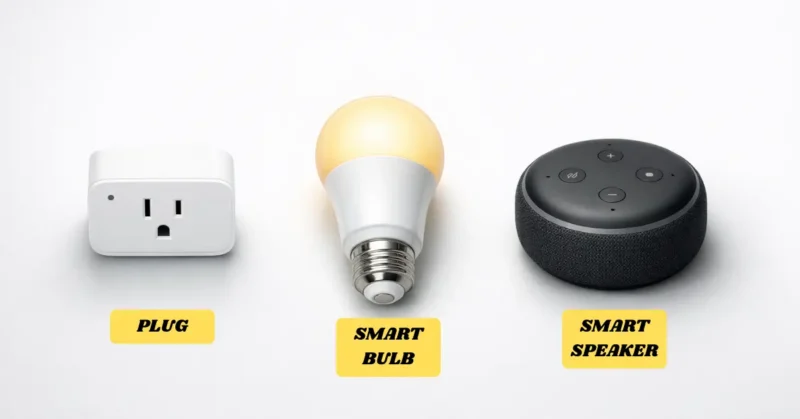
Here’s a practical starter kit that costs under ₹5,500 total and covers 80% of what most beginner smart home setups need.
- TP-Link Tapo P100 Smart Plug — ₹899
- Wipro Garnet 9W Smart Bulb (pack of 2) — ₹1,499
- Two Wipro Garnet 9W Smart Bulbs cost roughly ₹1,499 together and give you colour, dimming, and scheduling through the Wipro Smart app.
- Amazon Echo Dot 5th Gen — ₹3,499 (often on offer at ₹1,999)
Disclosure: This post contains affiliate links. If you click a link and buy something, I may earn a small commission — at zero extra cost to you.
You can start with just the plug and a single bulb for under ₹1,700. That’s enough to test whether you like the lifestyle before committing further.
What actually works is buying within one ecosystem first. If you get an Echo Dot, stick with Alexa-compatible devices for your first three months. Mixing ecosystems too early creates the confusion that makes people give up.
This is just a starter mix — if you want a complete ₹10,000 smart home plan with optimized device combinations, check out Smart Home on a Budget: Full Setup Under ₹10,000.
How to Set Up Smart Home Automation Without Hiring Anyone
Setting up smart home automation doesn’t require a technician or a YouTube binge. This section gives you the exact steps from unboxing to your first working automation.
The whole process — for one device — takes about 20 minutes. For a five-device setup, budget an afternoon.
For the complete step-by-step process — covering WiFi band separation, platform setup, device pairing, and your first automation routine — the full guide to setting up smart home without a hub walks through every action in exact sequence with nothing skipped.
What Your Wi-Fi Setup Needs to Support Smart Devices
Most smart devices run on 2.4GHz Wi-Fi, not 5GHz. Many newer routers broadcast both bands under the same name, which confuses devices during setup. Go into your router settings and separate the two bands — name one “Home_2.4G” and the other “Home_5G.”
If you’re unsure how to do this, check your router’s manual or search “[your router model] separate 2.4 and 5GHz” on YouTube. It takes about 10 minutes and solves about 70% of smart device connection problems before they start.
A weak Wi-Fi signal in the kitchen or bedroom is the second biggest setup killer. If your router is in the living room and your kitchen is at the far end of the house, consider a Wi-Fi range extender like the TP-Link RE330 (around ₹1,299). Dead zones kill smart home reliability completely.
Step-by-Step — Linking Your First Smart Device to Alexa or Google Home
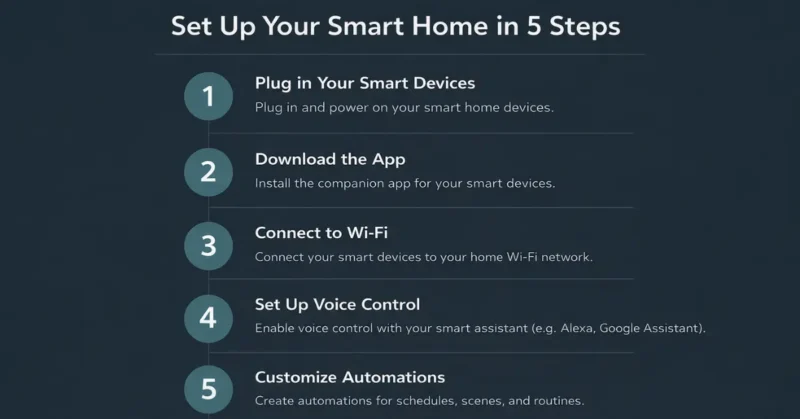
Here’s the exact process for a TP-Link Tapo smart plug with Alexa:
- Plug in your Tapo P100 and download the Tapo app
- Create an account and add the device in the app — it’ll ask you to connect to your 2.4GHz Wi-Fi
- Once it’s in the app, open the Alexa app and go to Skills & Games
- Search “TP-Link Tapo” and enable the skill — then tap “Discover Devices”
- Alexa finds your plug — give it a name like “Kitchen Socket”
Now say “Alexa, turn off Kitchen Socket” and watch it work. That first moment is genuinely satisfying.
The same process works for Google Home — install the Tapo Google action in the Google Home app, link your Tapo account, and your devices appear automatically.
Download the Tapo app and follow the Tapo app setup guide — the whole process from unboxing to first voice command takes under 15 minutes.
How to Create Automations and Schedules That Work While You Sleep
Automations are where smart home IoT 2026 moves from “cool toy” to genuinely useful. A schedule turns your geyser on at 5:45 AM so hot water’s ready when you wake up. A rule turns off all lights when you leave the house.
In the Alexa app, go to “Routines” and tap the “+” icon. You can set a trigger — a time, a voice command, or a device state — and then choose actions like switching devices on, playing music, or sending a notification.
The most underused automation in Indian homes is a “goodbye” routine triggered by a smart switch near the front door. One tap as you leave switches off every light, fan, and unnecessary appliance simultaneously. Families I’ve spoken to report saving ₹300–500 per month just from this one routine reducing standby power.
Basic schedules are just the beginning — AIoT-powered home automation takes this further by learning your patterns and adjusting your home’s behaviour automatically without you setting rules manually.
Which Smart Home Platform Should You Actually Choose?
Choosing the wrong platform early means replacing devices later. This section gives you a clear, opinionated answer based on what actually works in Indian conditions.
For a complete side-by-side breakdown of all three platforms — including Apple HomeKit which most Indian smart home guides ignore completely — the honest Alexa vs Google Home vs Siri comparison for India gives you every difference that actually matters for Indian households in 2026.
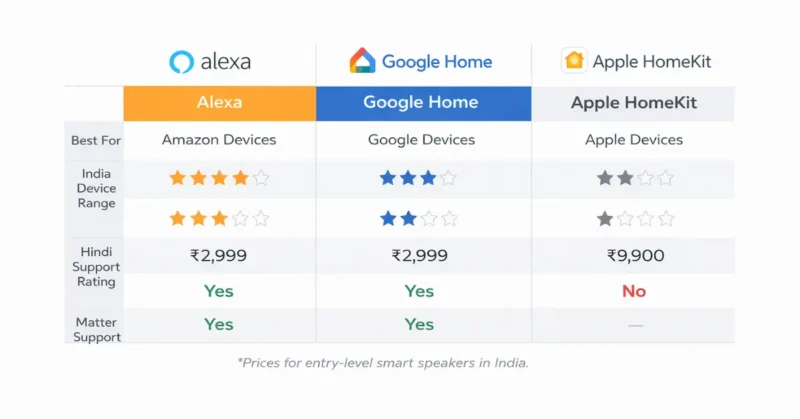
Alexa in India — Where It Works and Where It Doesn’t
Amazon Alexa has the largest selection of compatible smart home IoT 2026 products available in India. If you can think of a smart device, there’s likely an Alexa skill for it. TP-Link, Syska, Philips Hue, Wipro, Xiaomi — all work with Alexa.
Alexa’s Hindi support is functional but not conversational. It handles commands like “Alexa, geyser band karo” in some setups, but complex sentences in Hinglish can confuse it. For primarily English-speaking households, it’s excellent.
The weak point: Amazon’s ecosystem is heavily built around shopping. Alexa occasionally suggests buying things or upsells Amazon Prime features. If that bothers you, the Google ecosystem is cleaner.
If you want the full honest verdict on Alexa — including the specific features most Indian smart home guides never mention and an exact recommendation based on your household type — the complete Alexa India honest review 2026 covers every strength and limitation with nothing softened.
Google Home — The Best Choice for Android Users in India
If your entire family uses Android phones, Google Home is the smoothest experience. Google Assistant integrates with your calendar, Maps, Gmail, and YouTube in ways Alexa simply doesn’t.
The Google Home app got a major redesign in 2024 and is now genuinely easy to use. You can see all devices on one dashboard, create routines, and check device status at a glance.
Google Nest devices — the Nest Mini at ₹4,499, Nest Hub at ₹8,499 — are premium but durable. They hold their value better than budget alternatives, and Google’s software support is consistently strong.
Google Home’s context-awareness is just one example of how AI is making smart home platforms smarter in 2026 — the gap between a basic voice assistant and a genuinely intelligent home system is closing faster than most people realise.
Apple HomeKit — Powerful but Expensive, Is It Worth It?
Apple HomeKit is the most secure and private of the three platforms. It processes many commands locally on your device rather than through the cloud. That means faster response and no data going to a server.
The trade-off is price and ecosystem lock-in. Most affordable Indian smart home IoT 2026 brands don’t support HomeKit natively. You’d need to use a Homebridge server (a Raspberry Pi-based workaround) or buy premium brands like Eve, Philips Hue, or Meross — which are significantly more expensive.
Apple HomeKit makes practical sense only if you and your household primarily use iPhones and iPads. Trying to run HomeKit in a mixed Android/iPhone family creates friction — Android users can’t access the Home app, which defeats the whole purpose of shared home automation.
How Smart Home Devices Cut Your Electricity Bill — With Real Numbers
Smart home IoT 2026 devices don’t just offer convenience. Used correctly, they directly reduce your electricity bill — and the savings in India are more significant than in most countries because electricity tariffs are tiered and rise steeply with usage.
Let’s look at exactly where the money goes.
One of the biggest advantages of smart homes is energy efficiency. But instead of guessing, I actually tracked real usage — you can see the exact numbers in How Much Electricity Does Smart Home Save? Real Numbers & Data.
Smart Plugs and Standby Power — The Hidden Electricity Thief
Your TV, laptop charger, microwave, and set-top box consume power even when you think they’re “off.” This is called standby or phantom power. In a typical Indian home, standby power accounts for 5–10% of the monthly electricity bill.
A TP-Link Tapo P110 smart plug (around ₹1,299) monitors real-time energy consumption and lets you set auto-off schedules. Switch off your entertainment setup at midnight automatically, and you eliminate hours of unnecessary standby draw.
In practice, a household running five appliances on standby for eight hours can save ₹150–250 per month — that’s ₹1,800–3,000 per year. The plug pays for itself in four to seven months.
The next evolution beyond smart plugs is batteryless IoT sensors for home energy monitoring — devices that harvest ambient energy and report consumption data without ever needing a power source of their own.
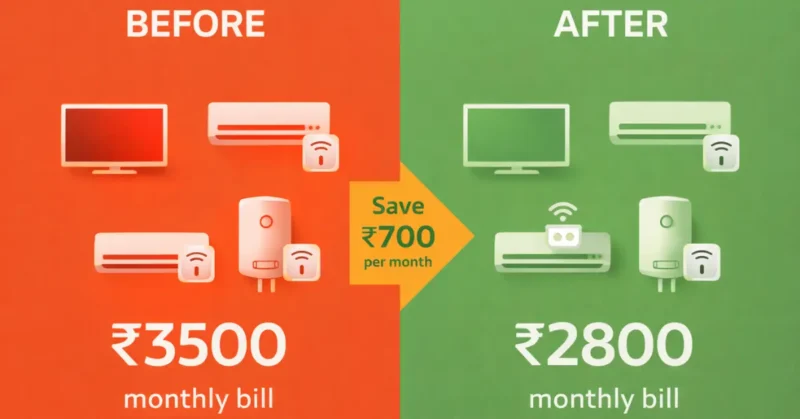
Smart Lighting — How Much Do LED + Automation Actually Save?
Standard ceiling fans and tube lights in Indian homes often run for 10–14 hours a day without anyone actually being in the room. Occupancy-based automation fixes this entirely.
A Philips WiZ bulb (around ₹999 each) combined with a cheap motion sensor (TP-Link Tapo T100, ₹1,099) can auto-switch lights off when no motion is detected for 10 minutes. In a home with three active zones, this alone can cut lighting bills by 25–35%.
Smart LEDs also consume 70% less power than the CFL bulbs still common in older Indian homes. Switching five CFL bulbs to smart LEDs and adding schedules saves both the electricity and the mental overhead of remembering to switch off.
Devices like smart plugs and AC automation can make a noticeable difference in electricity usage. I’ve shared a detailed breakdown with real data in How Much Electricity Does Smart Home Save?
Smart ACs and Geysers — Where the Biggest Savings Happen in India
Air conditioners account for 40–60% of a household electricity bill during summer months. Smart AC controllers — like the Sensibo Sky (₹5,999) or Cielo Breez Plus (₹4,999) — plug into your existing split AC’s IR receiver and make it app-controlled.
You can set the AC to turn off automatically 30 minutes after you usually fall asleep, turn on 10 minutes before your alarm, and disable when a window is left open. These small changes can cut AC-related consumption by 20–30% monthly.
Geysers are the single most wasteful appliance in Indian homes from a smart automation standpoint. Most families leave geysers on for an hour in the morning and forget. A ₹799 smart plug on your geyser with a 20-minute auto-off schedule can save 30–45 minutes of unnecessary heating per day — which adds up to roughly ₹400–600 per month depending on your tariff slab.
If you want to see exactly which devices deliver the best rupee-for-rupee savings in Indian homes — with real prices and energy monitoring comparisons — the best smart home devices under ₹5000 for Indian beginners breaks down every category with specific product picks ranked by ROI.
What Is the Matter Protocol and Why Should You Care?
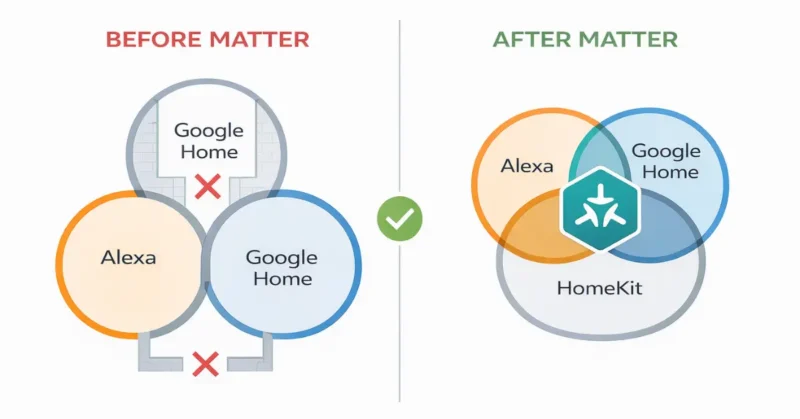
Matter is the reason 2026 is genuinely a different era for smart home IoT 2026. Before Matter, buying smart home devices felt like choosing a side — Amazon’s world, Google’s world, or Apple’s world. Matter ends that.
The Problem Matter Was Designed to Fix
Before 2022, a Philips Hue bulb might work with Alexa but not Google Home without a workaround. An Aqara sensor might require its own hub to communicate with your smart speaker. Every brand had its own app, its own cloud, its own rules.
This incompatibility wasn’t a design flaw — it was a business decision. Brands wanted you locked into their ecosystem so you’d keep buying their products. It was genuinely frustrating.
Matter, developed by the Connectivity Standards Alliance with backing from Apple, Google, Amazon, and Samsung, is an open standard. A Matter-certified device works with any Matter-compatible hub or platform — no workarounds needed.
Which Brands and Devices Support Matter in 2026
As of early 2026, Matter support has expanded significantly. These brands and devices are fully Matter-certified: Philips Hue, Eve, Nanoleaf, TP-Link Tapo (select models), Meross, Aqara (newer models), and Xiaomi (some Mi Home devices).
Smart speakers and hubs acting as Matter controllers include: Amazon Echo (4th Gen and later), Google Nest Hub (2nd Gen), Apple HomePod (1st and 2nd Gen), and Samsung SmartThings Hub.
What actually works is checking for the Matter logo on the box before buying. Indian e-commerce listings don’t always highlight it — search “[product name] Matter compatible” before purchasing to verify.
Matter’s Thread protocol is particularly important for energy harvesting sensors compatible with modern IoT standards — Thread’s low-power mesh design is exactly what batteryless devices need to stay connected without draining any power source.
Does Your Existing Smart Home Iot 2026 Work With Matter?
Older devices that predate Matter won’t automatically gain compatibility — but you won’t need to throw them away. Most major platforms (Alexa, Google Home, HomeKit) still support older devices through their existing cloud bridges.
What Matter changes is your future purchases. Any new device you buy with the Matter logo works with every platform simultaneously. You’re never locked in again.
If you have a Google Nest Hub 2nd Gen or an Amazon Echo 4th Gen, you already have a Matter controller in your home. You don’t need to buy anything extra to start using Matter devices.
Smart Home Problems You’ll Face — and Exactly How to Fix Them
Even a well-set-up smart home IoT 2026 has frustrating moments. Devices go offline, apps pile up, and sometimes nothing responds to your voice command. Here’s how to handle the most common issues without losing your mind.
Why Your Smart Devices Keep Disconnecting From Wi-Fi
The most common reason smart devices disconnect is Wi-Fi congestion on the 2.4GHz band. Most homes have 15–30 connected devices — phones, tablets, laptops, smart devices — all competing for bandwidth on one channel.
Go into your router’s admin settings and manually set your 2.4GHz channel to 1, 6, or 11 — these are the non-overlapping channels that cause the least interference. Most routers default to “Auto,” which often picks a congested channel.
The second reason is IP address conflicts. Your router assigns dynamic IPs that can change. Set “static IP” or “DHCP reservation” for each smart device in your router settings so they always get the same address. TP-Link, D-Link, and Netgear routers all have this option in their web admin panel.
Too Many Apps — How to Control Everything From One Place
Within a month of building your smart home IoT 2026, you might have six different apps: Mi Home, Tapo, Wyze, Wipro Smart, Amazon Alexa, and Google Home. That’s not a smart home IoT 2026 — that’s a mess.
Google Home and Amazon Alexa both act as universal controllers for most major brands. Link each brand’s account to one of these apps and you can control everything from a single interface.
The most practical fix is a cheap 7-inch Android tablet (₹6,000–8,000, like a Lenovo Tab M7) permanently mounted near your front door running the Google Home or Alexa app as a dedicated wall dashboard. It replaces reaching for your phone constantly and makes the smart home feel genuinely seamless for the whole family — including family members who won’t bother with the phone app.
If you’ve ever wondered why your smart sensor sometimes misses a trigger or sends a false alert, understanding how IoT sensors communicate and process data at the hardware level actually helps you configure them better — even without any coding knowledge.
When to Upgrade Your Router and What to Buy
If your router is more than four years old, it’s probably the real bottleneck in your smart home IoT 2026. Older routers struggle with more than 15 connected devices and can’t handle the packet frequency smart devices require.
TP-Link Archer AX23 (Wi-Fi 6, dual-band) retails for around ₹4,499 on Amazon India and supports up to 150 devices without performance degradation. It’s the single best smart home investment after your devices themselves.
A mesh router system — like TP-Link Deco M5 (₹7,999 for a 2-pack) — solves dead zones entirely. Two nodes placed strategically in a 1,500 sq ft apartment eliminate virtually all Wi-Fi dropout issues that plague smart home setups in Indian apartments.
Smart Home IoT 2026 Growth: The Numbers That Explain Why Everyone’s Talking About It
The smart home IoT 2026 market isn’t a future prediction anymore — it’s already happening at scale. Here are the numbers that show you exactly how quickly this space is moving and what it means for you.
1. The global smart home market was valued at $121 billion in 2025 and is projected to reach $231 billion by 2030, growing at a CAGR of 13.8%. Source: Statista Smart Home Report, 2025 For you, this means device prices will keep falling and compatibility will keep improving — the ecosystem you invest in now will only get richer.
According to the Statista Smart Home Market Report, the global smart home market was valued at $121 billion in 2025 and is projected to reach $231 billion by 2030.
2. India’s smart home market is expected to grow at 25% annually through 2028, making it one of the fastest-growing smart home markets in the world. Source: India Brand Equity Foundation (IBEF) & RedSeer Consulting, 2025 This growth is driving Indian-specific products, pricing in rupees, and Hindi language support for voice assistants — all things that didn’t exist meaningfully five years ago.
3. Smart home devices reduce household energy consumption by an average of 15–20% when used with automated scheduling and occupancy sensors. Source: McKinsey Global Institute, Energy Efficiency in Residential IoT, 2024 For an Indian household spending ₹3,000/month on electricity, that’s a potential saving of ₹5,400–7,200 per year — more than enough to recover the cost of a starter smart home kit.
Research from McKinsey Global Institute shows smart home devices reduce household energy consumption by 15–20% when paired with scheduling automation.
4. 72% of smart home IoT 2026 device buyers in Asia-Pacific said “energy savings” was the primary reason they purchased IoT home products — not convenience or novelty. Source: Deloitte Consumer Technology Survey, Asia-Pacific, 2025 This aligns with budget-conscious homeowners who want technology that pays for itself — not gadgets for gadgets’ sake.
5. The average number of connected devices per Indian household crossed 8 in 2025, up from just 3.2 in 2020. Source: TRAI Annual Report on Connected Devices, 2025 Most Indian homes are already running mini-networks — adding smart home devices isn’t a leap, it’s a natural next step.
6. Matter protocol adoption reached 4,000+ certified products from 400+ companies worldwide by Q4 2025 — a 200% increase from the same point in 2023. Source: Connectivity Standards Alliance (CSA) Matter Certification Report, Q4 2025 For buyers in India, this means more affordable options that work across platforms — Xiaomi, TP-Link, and Wipro have all added Matter-certified devices to their Indian catalogues.
The Connectivity Standards Alliance confirmed that Matter-certified products crossed 4,000 devices from 400+ companies by Q4 2025.
Smart home IoT 2026 has crossed the critical threshold in India where it’s no longer about luxury — it’s about efficiency. A ₹5,000 investment in the right devices, set up correctly, can return ₹6,000–9,000 in annual energy savings. The return on investment now makes smart home adoption a financial decision, not just a lifestyle one. That shift changes everything about how homeowners should think about whether to start.
FAQs – Smart Home IoT 2026
What smart home devices should I buy first in India?
Start with a smart plug and a smart speaker — these two devices give you the most immediate utility. The TP-Link Tapo P100 smart plug (₹899) and an Amazon Echo Dot 5th Gen (₹3,499, often discounted to ₹1,999) together cost under ₹5,000 and work out of the box. The smart plug handles your existing appliances; the Echo Dot gives you voice control. Tip: buy both from the same platform ecosystem to avoid compatibility headaches.
Do smart home devices work without the internet?
Most smart home devices need an active internet connection for cloud-based features like remote access and voice commands. However, devices using Zigbee or Z-Wave with a local hub — like a Samsung SmartThings hub — can continue basic functions during an internet outage. Matter’s Thread protocol also supports local control. For Indian homes with frequent outages, investing in a local hub or choosing Thread-compatible devices adds meaningful reliability. Tip: check whether a device supports “local processing” before buying.
How much does it cost to set up a basic smart home IoT 2026 in India?
A functional smart home starter kit — one smart speaker, two smart bulbs, and two smart plugs — costs between ₹5,000 and ₹8,000 depending on brands chosen. Amazon Echo Dot (₹3,499) + Wipro smart bulbs (₹799 each) + two TP-Link plugs (₹899 each) comes to roughly ₹6,895. Mid-range setups with a smart lock and camera run ₹15,000–25,000. Tip: start small, prove the value to yourself, then expand — don’t try to automate everything at once.
Is a smart home safe from hackers?
Smart home IoT 2026 security depends on how you set it up. Devices on a weak password or a shared public Wi-Fi network are genuinely vulnerable. Always use a strong, unique password for your home Wi-Fi, enable two-factor authentication on your Alexa or Google Home account, and keep device firmware updated. Creating a separate “IoT VLAN” or guest network for smart devices — available on routers like TP-Link Archer AX23 — keeps them isolated from your main devices. Tip: change default passwords on every device immediately after setup.
Do smart home devices work with Indian voltage (220V)?
Yes — virtually all smart home devices sold on Amazon India and Flipkart are rated for 220–240V and are BIS-certified. Brands like TP-Link Tapo, Wipro Smart, Syska, and Mi Home design their Indian SKUs for local voltage, humidity, and power fluctuation conditions. Avoid importing cheap US-spec devices (110V) without a voltage converter, as they can damage both the device and your appliances. Tip: always check for BIS certification (the ISI mark or BIS logo) on the product listing before buying.
What is the best smart home ecosystem for Android users in India?
Google Home is the best ecosystem for Android users in India. It integrates natively with your Android phone, Google Calendar, Gmail, and Google Maps for contextual automations. The Google Nest Mini (₹4,499) delivers excellent audio quality for its size and responds accurately to Indian English accents. Google Home also supports Matter, meaning you’re not limited to Google-branded devices. Tip: link your Google account to the Google Home app from the start — this enables personalised routines based on your real schedule.
CONCLUSION – Smart Home IoT 2026
You now know more about smart home IoT 2026 than most people who’ve owned smart devices for two years. You know which devices to buy first, how to set them up without tech headaches, and exactly how the savings work in real rupee terms.
Here are three things you can do today: First, separate your 2.4GHz and 5GHz Wi-Fi bands in your router settings — takes 10 minutes and fixes most connection problems in advance. Second, order a TP-Link Tapo P100 plug and plug it into your geyser or TV — you’ll see your standby waste in real-time and immediately understand the potential. Third, download either the Alexa app or Google Home app and explore Routines — even before buying any devices, you can see how automations work.
Smart home doesn’t have to be expensive or complicated. One device, set up well, changes how you feel about it immediately.
If you prefer starting with a fixed budget and a clear roadmap, my guide on Smart Home on a Budget: Full Setup Under ₹10,000 will help you set everything up without overthinking.
Drop a comment below and tell me — what’s the first smart home IoT 2026 thing you’re going to try? Or share this guide with someone who keeps asking “is this really worth it?” — you already know the answer.