

Last Updated: March 2026 — Big news: Razer has officially rebranded Project Ava to Razer AVA and unveiled major agentic upgrades at GDC 2026. Scroll down to the new section or keep reading for the full picture.
At CES 2026, Razer didn’t just launch another gadget — it challenged the very idea of what an AI assistant should be. Forget invisible voices trapped inside speakers or flat chat windows on your phone. Razer Project Ava is a holographic AI desk companion that actually lives on your desk, reacts to you, and helps you play, work, and live better.
Razer calls it an “emotional AI companion,” but the internet quickly gave it a simpler name: Jarvis for gamers.
Fast forward to March 2026, and Razer AVA isn’t just a holographic desk companion anymore — it’s a fully agentic AI that can actually do things for you, not just talk. Think less Siri, more Jarvis who actually books your meetings.
What makes Ava different from ChatGPT, Siri, or Alexa is its physical presence. It sits inside a glowing 5.5-inch “AI jar,” tracks your eyes, reads your screen, shows facial expressions, and reacts in real time. This isn’t just an assistant — it’s a backseat gamer that wants you to win.
And that’s exactly why Razer Project Ava CES 2026 updates are already dominating tech conversations.
Razer Project Ava also reflects a broader shift in the AI industry, similar to Meta’s aggressive 2026 AI roadmap that signals an escalating competition among tech giants.

Table of Contents
The Tech Behind the Magic: What Powers Razer Project Ava?
Glasses-Free 3D Hologram Display
At the heart of Ava is a 5.5-inch light-field holographic display that creates depth without requiring VR glasses. Unlike flat screens, Ava appears layered and alive, maintaining perspective even when you move your head. This alone makes it one of the most eye-catching holographic AI desk companion 2026 products ever shown.

Grok AI Integration (Yes, That Grok)
One of the most talked-about features is the Razer Project Ava Grok AI integration. Ava is currently powered by xAI’s Grok, giving it a bold, witty, sometimes sarcastic personality — a sharp contrast to the overly polite tone of traditional assistants.
While Ava brings AI into a physical form, many users still rely on powerful research assistants like Perplexity AI for fast, citation-based answers.
This makes conversations feel less robotic and more like interacting with a real digital character.
Ava is currently powered by Grok AI from xAI, known for its bold conversational style.
PC Vision Mode: It Can See Your Screen
A major question people keep asking is: “Can Razer Project Ava see my PC screen?”
Yes — and that’s the point.
Using a high-bandwidth USB-C connection, Ava can visually analyze your PC screen in real time. Whether you’re gaming, editing documents, or designing slides, Ava understands context instantly and reacts accordingly.
GDC 2026 Update: Razer AVA Goes Fully Agentic (March 2026)
This is the biggest update since CES. If you bookmarked this article back in January, here’s what changed.
From “Project Ava” to “Razer AVA”
Razer has officially dropped the “Project” label. It’s no longer a concept — it’s a product in active development, and Razer is calling it simply Razer AVA. That name change matters. It signals Razer is serious about shipping this thing.
What “Agentic” Actually Means for You
At GDC 2026, Razer AVA introduced agentic capabilities — the ability to interpret your intent, plan multi-step actions, and execute them across connected tools and services. Razer In plain English? You don’t just ask AVA for advice anymore. You tell it what you want to achieve, and it figures out the steps.
For example:
- Instead of reminding you to set up your stream, AVA can now initiate the workflow — launching the relevant tools and moving the setup forward.
- Instead of telling you to book a meeting, it can coordinate calendars with other users’ AVA companions.
That last one is genuinely new: Companion-to-companion coordination enables agent-to-agent communication so AVA companions can coordinate end-to-end tasks across users, including proposing meeting times, booking calendars, and confirming schedules.
Razer Inference Control Plane — The Hidden Tech
Behind all of this is a new system called the Razer Inference Control Plane. It routes tasks between local and cloud models to maintain low latency KitGuru — meaning AVA decides on its own whether to process your request on your PC or send it to the cloud, depending on what’s faster. This is huge for real-time gaming use cases where even a second of lag kills the experience.
Open AI Architecture — Not Just Grok Anymore
Your original question “Is Razer AVA only powered by Grok?” has a new answer. Razer says AVA is built with an open architecture intended to support other leading AI platforms, including a proprietary Razer AI. PC Guide So while Grok runs the show right now, future updates could bring Claude, Gemini, or Razer’s own model into the mix. That’s a smart hedge in a fast-moving AI market.
Third-Party App Integration
AVA can now interface with supported services, chat platforms, and apps such as Spotify to act on behalf of the user in real time. Razer It’s moving from being a desktop personality to being a genuine operating layer on your PC.
Meet the Avatars: From Anime to Esports Legends
Razer knows personality sells — and Ava delivers.
Custom Avatars at Launch
At launch, Ava introduces five customizable characters:
- Kira – A supportive anime-style gaming companion
- Zane – A tattooed, no-nonsense muscle strategist
- Faker – Yes, the Faker. The Razer Project Ava Faker avatar is already a high-traffic search term thanks to League of Legends fans
- SAO – Inspired by South Korean idols and influencers
- Core Ava – A neutral, professional default assistant

Adaptive Learning
Ava doesn’t reset every day. It learns your habits, moods, gaming style, and even preferences like clothing colors and daily routines. Over time, it feels less like software and more like a persistent digital presence.
Privacy & the Physical Kill Switch (The Most Underrated Feature)
In a world where smart speakers are always listening, Razer actually did something refreshing here. Let’s break it down.
With great AI comes great concern — and Razer knows it.
On-Device Processing
Razer Project Ava privacy and data security is a core selling point. Much of Ava’s processing happens locally on your PC instead of the cloud, addressing growing US and UK privacy concerns.
Hardware Controls
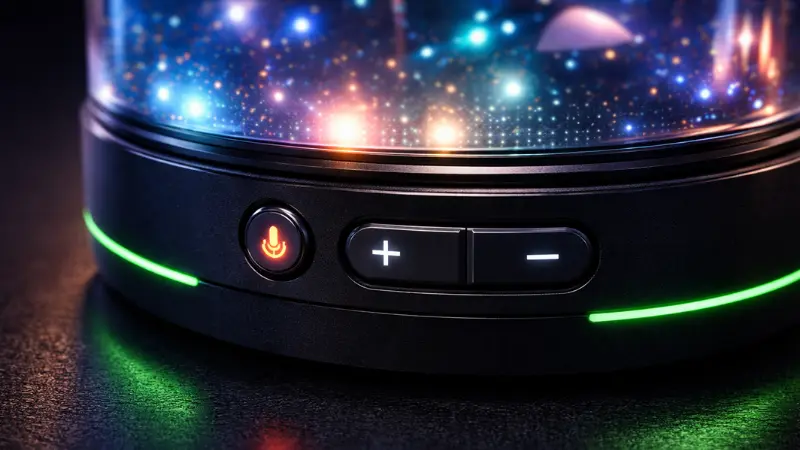
Ava includes physical buttons for mute and volume. No hidden menus. No guessing. When it’s muted, it’s actually muted.
Contextual Awareness Without Spying
While Ava uses an HD camera for eye tracking, it focuses on gaze direction — not scanning your room. Razer emphasizes contextual awareness without surveillance.
Gaming vs Reality: Top 5 Real-World Use Cases
Honestly, the life planner use case surprised me the most. Nobody expected a gaming companion to suggest your outfit for the day — but here we are, and it actually works.
1. The Pro Gaming Coach
In titles like Battlefield 6 or League of Legends, Ava provides real-time tactical advice, positioning tips, and cooldown reminders.
2. The Life Planner
Running late? Ava suggests outfits based on weather, calendar events, and your past preferences — a surprisingly useful daily feature.
3. The Work Consultant
From brainstorming ideas to summarizing long documents, Ava becomes a second brain during work hours.
4. Language Translator
Ava supports real-time verbal translation, making it useful for global meetings and international gaming squads.
5. Wellness & Emotional Support
Unlike cold chatbots, Ava offers encouragement, habit tracking, and emotional check-ins — subtle, but effective.
Razer AVA Beta: How to Get Early Access in 2026
Here’s something most people don’t know yet — you don’t have to wait for the hardware to try Razer AVA.
Razer AVA includes advanced agentic AI features such as personalized assistance, intelligent task automation, persistent memory, and contextual recommendations designed for gamers, developers, and creators.
Users can sign up for the Razer AVA Beta for early access via Razer Cortex. Beta participation is limited, and only selected applicants will be invited to join. You’ll need to sign an NDA once accepted, and beta data is wiped at the end of the program.
Early access invitations are rolling out to select users starting Q2 2026. So if you want to get in before the public launch, now is the time to sign up on Razer Cortex.
Who should apply? Gamers, streamers, developers, and productivity users who want to shape how this product evolves. Beta testers will directly influence what Razer builds.
Razer Project Ava Price, Release Date & Reservations
One of the biggest search questions right now is Razer Project Ava price and release date.
Here’s what we know so far:
Reservation: Currently, US residents can reserve the Razer Project Ava with a refundable $20 deposit on the official Razer store.
Final Price Prediction: Experts expect Ava to launch between $999 and $1,299, depending on configuration.
March 2026 Update: As of now, Razer has still not confirmed a final price. Units are expected to be ready to ship between July 1 and December 31, 2026 — though Razer notes this is an estimate and subject to change. The $20 deposit from reservation will count toward your final purchase price via a promo code.
One important note: final units will only be available to ship to the fifty US states and the District of Columbia. No international shipping has been confirmed yet.
Subscription Model: Many are asking, “Does Razer Project Ava require a subscription?”
While not officially confirmed, industry insiders expect a possible Synapse AI monthly plan for premium avatars, cloud features, or advanced analytics.
Release Date: Shipping is expected in the second half of 2026.
Razer Project Ava vs Apple Vision Pro Persona
| Feature | Razer Project Ava | Apple Vision Pro Persona | Amazon Alexa |
|---|---|---|---|
| Physical Form | 5.5″ Desktop Hologram | VR Headset | Smart Speaker |
| AI Engine | xAI Grok + Open Architecture (Claude, Gemini support planned) | Apple Intelligence | Alexa LLM |
| Primary Use | Gaming & Lifestyle | Work & Media | Smart Home |
| “Cool” Factor | Very High | Medium | Low |
| Agentic Capabilities | Yes — Multi-step tasks | No | No |
This comparison clearly positions Ava as a desk-first AI companion, not a wearable or voice-only device.
FAQs
What is Razer Project Ava used for?
Razer Project Ava is designed as a holographic AI desk companion that assists with gaming strategies, productivity tasks, daily planning, and emotional support through interactive avatars.
Is Razer Project Ava different from ChatGPT or Alexa?
Yes. Unlike voice-only or screen-based assistants, Razer Project Ava has a physical holographic presence, facial expressions, eye tracking, and real-time PC screen analysis.
Can Razer Project Ava see my PC screen?
Yes. Using a high-bandwidth USB-C connection, Ava can analyze your PC screen in real time to provide gaming tips, workflow suggestions, and contextual assistance.
Does Razer Project Ava require a subscription?
Razer has not officially confirmed a subscription, but industry experts expect optional paid plans for premium avatars, advanced AI features, or cloud-based services.
How to reserve Razer Project Ava holographic companion?
Currently, US residents can reserve the Razer Project Ava with a refundable $20 deposit through the official Razer store.
Is Razer Project Ava safe for privacy?
Razer states that Ava focuses on on-device processing, physical mute controls, and limited camera usage for gaze tracking, addressing major privacy and data security concerns.
What is the Razer AVA Beta and how do I join?
The Razer AVA Beta is an early access program where selected users can test AVA’s agentic AI features before the hardware launches. You can sign up through Razer Cortex. Spots are limited and require an NDA. Early invitations begin rolling out in Q2 2026.
What’s the difference between Razer Project Ava and Razer AVA?
“Razer Project Ava” was the CES 2026 concept name. Razer has since officially rebranded it to Razer AVA and upgraded it with agentic capabilities at GDC 2026, meaning it can now plan and execute multi-step tasks — not just answer questions.
Final Verdict: Talking Toy or Future Digital Friend?
So, what is Razer Project Ava really?
It’s not just a gimmick. It’s not just an assistant. Ava represents the future of human-PC interaction, where AI has presence, personality, and purpose.
Whether it becomes your gaming coach, productivity partner, or emotional support system depends on how you use it. But one thing is certain — the era of boring chatbots is over.
The GDC 2026 update changes the conversation. This is no longer just about a cool hologram on your desk. Razer AVA is now positioning itself as an agentic AI layer for your entire PC workflow — one that handles your calendar, your game setup, your Spotify queue, and your teammate coordination, all while looking like a character from your favorite anime. Whether that’s brilliant or overkill depends on you. But it’s getting harder to call it a gimmick.
Would you spend $1,000 on a holographic desk companion that learns, reacts, and grows with you?
Tell us in the comments.
1 thought on “Razer Project Ava (Now Razer AVA): Price, Agentic, Beta 2026”